Creative Communities of the World Forums

The peer to peer support community for media production professionals.

Activity Forums Apple Final Cut Pro Is this fixable?

  • Is this fixable?

    Posted by Viktor Rjabkov on July 9, 2025 at 1:30 pm

    Hey, I’m pretty inexperienced with working with greenscreens. I tried shooting a video for my best friend where he’s standing in front of a greenscreen, and we wanted to add animations.

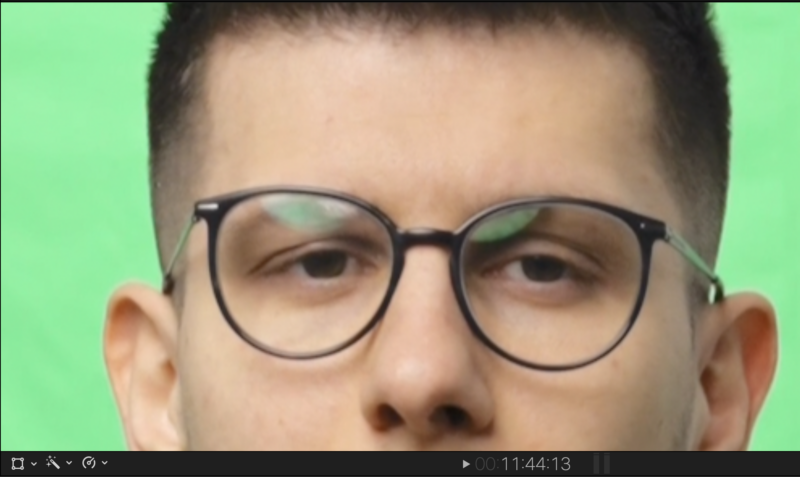
    I’m having trouble removing the reflections of the greenscreen in the glasses and on the sides of the glasses. I just can’t seem to get a clean mask.

    I’ve attached a screenshot of the original greenscreen and another one where I added a purple background to show how bad the mask is.

    Can anyone recommend a good video or explain how to create a proper greenscreen mask?

    A few details about the video:

    • Camera: Sony A7SIII + Sony FE 24-70mm f/2.8 GM II lens
    • Shot in Slog 3 – 60fps – 4k
    • Software i can use = Davinci Resolve and Fcpx
    Eric Santiago replied 11 months, 1 week ago 3 Members · 2 Replies
  • 2 Replies
  • Devrim Akteke

    July 9, 2025 at 2:24 pm

    Hi,

    Even with the best green screen recording, those glasses are always a problem. If the man doesn’t turn his head to the sides too much, you can duplicate a copy of the clip and place it above, and draw a mask to get rid of this problem. Additionally, another option, maybe using a magnetic mask, could be helpful too. You can find some good tutorials about magnetic masks, and you will see how easy it is to use.

  • Eric Santiago

    July 9, 2025 at 2:56 pm

    Other workflows include a round in other apps (for me After Effects) where I do my best to remove color cast (green) and anomalies first.

    Then export with green screen intact (exterior of character) then use in what works for you.

We use anonymous cookies to give you the best experience we can.
Our Privacy policy | GDPR Policy