Creative Communities of the World Forums

The peer to peer support community for media production professionals.

Activity Forums Adobe After Effects Is there a way to keep the tracker enlargement on constantly?

Tagged: 

  • Is there a way to keep the tracker enlargement on constantly?

    Posted by Anthony Sneed on April 10, 2023 at 6:27 pm

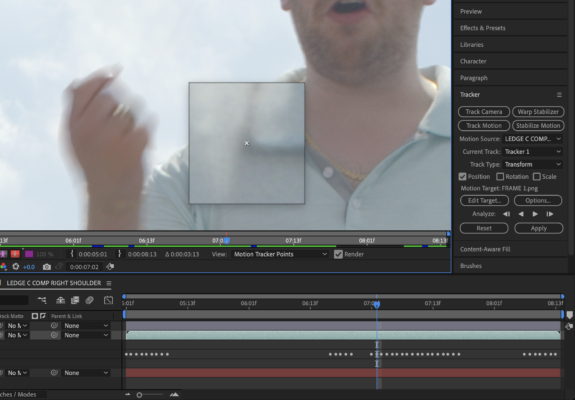
    Sometimes when I need to manually move the tracker window, I need to see where the point is sitting more clearly, so I click on the box and it enlarges. Is there a way to get it to stay enlarged so I can go through the entire clip without having to constantly click on the box?

    Boston Cainfra replied 3 years ago 3 Members · 4 Replies
  • 4 Replies
  • Anthony Sneed

    April 10, 2023 at 6:29 pm

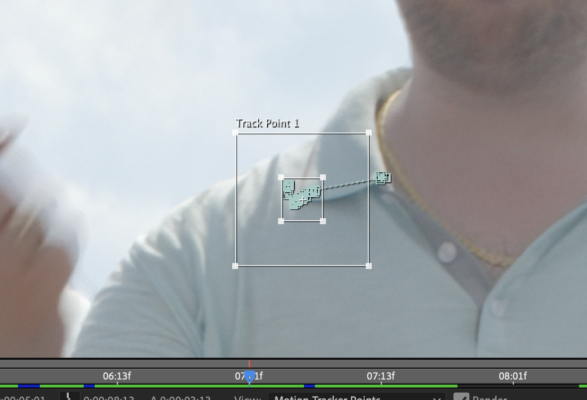
    Otherwise, it looks like this, and I can’t see anything underneath all of the tracker points.

  • Anthony Sneed

    April 11, 2023 at 3:49 pm

    Anyone?

  • Usama Aslam

    April 12, 2023 at 10:13 pm

    Hi Anthony,

    I do have a solution for your problem. When you click on the box to enlarge the tracker window, press the ~ (tilde) key on your keyboard to switch to full-screen mode. This will make the tracker window and the entire composition take up the entire screen, making it easier to see the tracker points and the underlying footage.

    To exit full-screen mode and return to the regular interface, press the ~ key again. Alternatively, you can also use the keyboard shortcut CTRL + ALT + F to toggle full-screen mode on and off.

  • Boston Cainfra

    April 14, 2023 at 6:19 am

    Hello there

    Use moccha is it inside of ae. It has much better tracker control. The basic idea of tracking is to find a big contrasted piece on the video if you haven’t try to add more contrast or less brightness to make ideal preset for tracking. Basically you never needs to move the tracking control window.

We use anonymous cookies to give you the best experience we can.
Our Privacy policy | GDPR Policy