

Activity › Forums › Adobe After Effects › Inner Shadow EFFECT ?
-

Chris Mellor
September 10, 2016 at 1:48 pmYou’re correct that my reluctance to precomping is about organization/navigation. I’m going to have dozens of assets in my project and animating each in their own comps sounds like a nightmare.
I’ll work with two windows or maybe link all the effects to a master layer using “Copy with Property Links”
Thanks for all the feedback guys! I may send in a feature request. Still seems weird that they have an effect for Drop Shadow and none of the other Layer Styles.
-Chris
-

Roei Tzoref
September 10, 2016 at 2:07 pmit’s hard to tell without seeing your exact setup, but if you apply this type of effect you probably need it to affect just one layer at a time and not a composite, so no need to pre-compose more than one layer or am I wrong?. if this is the case could just precomp the layer that needs the inner shadow with “Leave all attributes”. keyframes will stay in the master comp, and navigation is only an issue when setting the style of the inner shadow in the context of the other layers. since this is a pretty simple effect this should not take too much time.
-

Jordan East
January 15, 2019 at 12:34 amverrrrrryyyy nice, i needed an inner shadow with the ability to feather, this worked perfectly!!
I’ve never used CC Composite before, another great tool that has slid under the radar
-

Robert Müller
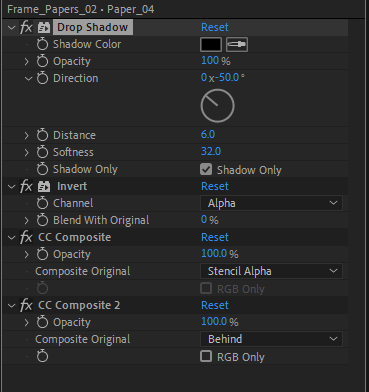
September 9, 2020 at 9:07 amHi, I dont know if this is really relevant since I dont see anybody you replied to that pushed this topic to the top, but I wanted to comment on your solution since I do not think its ideal. For me this solution has problems with some layers since the Invert alpha effect seems to retain the bounding box. And the shadow is not really acurate as it just gets cut out kinda. If you first apply a Channel Combiner effect, with settings from “Alpha” to “Alpha only” its inverting the alpha based on the whole composition size. if you then add a drop shadow you get a “real” inner shadow, which you then can cut out and compose using CC composite twice, as you did. I think this result is much closer to a “real” inner shadow effect.
Thats all, just read this topic and couldnt help but try it myself 🙂
-
Roei Tzoref
September 11, 2020 at 9:43 pmthanks Robert, after I posted I saw that I needed another thing to reduce the edge that was left from the layer cutting into itself so I added simple choker:
using your method of channel combiner does give a more accurate edge, but I see I still get the the boundary (which is now bigger).
Reply to this Discussion! Login or Sign Up