

Activity › Forums › DaVinci Resolve › Importing an XML file into Resolve, some files ‘not yet found’
-
Importing an XML file into Resolve, some files ‘not yet found’
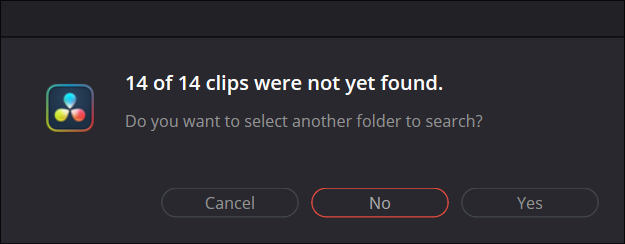
Posted by Thomas Kaufman on January 27, 2025 at 9:38 pmI’m importing an XML file into Resolve, and I get this error message (see image). I’ve tried doing this with importing the footage first, and also without importing the footage first. Same issue both times.
thanks,
 Eric Santiago replied 1 year, 7 months ago 4 Members · 7 Replies
 -
7 Replies
-

Mads Nybo jørgensen
January 27, 2025 at 10:35 pmHey Thomas,
Have you tried to highlight the missing clips, and then select relink footage?
(You are likely to have to browse to the folder with the clip ion, rather than use search)Atb
Mads -

Thomas Kaufman
January 27, 2025 at 10:49 pmHey Mads,
I have 4 days of material I’ve shot, so finding 14 clips that aren’t there…not sure how to do that or why those clips are not found.
-
Mads Nybo jørgensen
January 27, 2025 at 10:53 pmHey Thomas,
Have you investigated whether the clips is actually in your media folder?
As, you need to locate them manually, before looking for them from inside Davinci.Also, it would be helpful if you tell us a bit about your hardware and software set-up?
Atb
Mads -
Thomas Kaufman
January 27, 2025 at 11:17 pmHi Mads
I’m running Resolve 19 on an Alienware R16 desktop.
Resolve is giving a list of files it cannot find, but with over 20 it would takes hours to locate and transfer each individually.
thanks,
Tom
-

John Doggett-williams
January 27, 2025 at 11:34 pmA familiar problem. I did solve it by going back to the original project and painstakingly removing all fades and dissolves, video and audio. I think I did the same for opacity and audio keyframes but try the dissolves first. It worked for me. I don’t think any edit software Da V, FCP or Prem Pro has put a lot of time into making XMLs work seamslessly. I would think far more of them if they did.
-
Mads Nybo jørgensen
January 27, 2025 at 11:39 pmHey Tom,
Snap, after waiting for 4-months for HP to fix my broken high-end HP Fury 16 G10, within warranty when the problem started.
(YouTube video here with my fan on overdrive, and BIOS not upgrading – interestingly, I am not the only one with this problem.
Edited on Davinci: https://youtu.be/7NvFomqastY?si=x27RJUKGAgwXmun7).I just last week took delivery of a DELL Alienware R18 – trying to make it run every professional PC editing software going.
Sorry, just a distraction – here goes:
As you will have the file name inside Davinci.
Copy that.
Go to your File Explorer (hold Windows Key + e).
Start a search in your top directory, or on the drive, using the copied filename.Hopefully that will tell you if the file is there, and in what folder.
Then you can relink to that – should not take you long to do.Atb
MadsSome contents or functionalities here are not available due to your cookie preferences!This happens because the functionality/content marked as “Google Youtube” uses cookies that you choosed to keep disabled. In order to view this content or use this functionality, please enable cookies: click here to open your cookie preferences.
-

Eric Santiago
January 28, 2025 at 3:43 pmIn the past, I would just import the files into that project and try to force it from there.
In the past of course (R12 and lower).
Reply to this Discussion! Login or Sign Up