

-
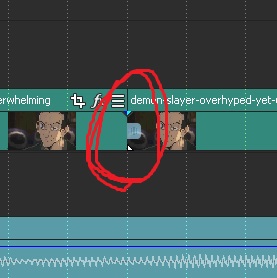
I dont know what did I clicked….
Posted by Oscar Memo Buentello on April 30, 2021 at 12:46 amTHIS ANNOYING THING…how can I take it off???!!! it messes with my work flow!
thx
 Edward Troxel replied 5 years, 4 months ago 2 Members · 3 Replies
 -
3 Replies
-

Edward Troxel
April 30, 2021 at 2:12 pmLooks like you may have pressed “S” and “Split” the video there. If that’s the case, Vegas Pro 18 has a “heal” function built in. Or an easy way is just to delete the event on the right and then expand the event on the left to fill the empty space. Then the split would be gone.
-

Oscar Memo Buentello
May 1, 2021 at 2:49 pmnooo..the split is fine..but that blue little square was never there…I pressed something in VIEW or dont remember..and I dont want to see it…I only want to turn it off.
someone knows where to press?
-
Edward Troxel
May 4, 2021 at 8:04 pmClick on the “hamburger” button on the right edge of the event (it’s the three lines on the far right edge of the event. On the menu that open, deselect “Event Handles”.
Reply to this Discussion! Login or Sign Up