Creative Communities of the World Forums

The peer to peer support community for media production professionals.

Activity Forums Adobe After Effects How would you approach this simple issue?

  • How would you approach this simple issue?

    Posted by Wesley Post on February 5, 2021 at 9:32 pm

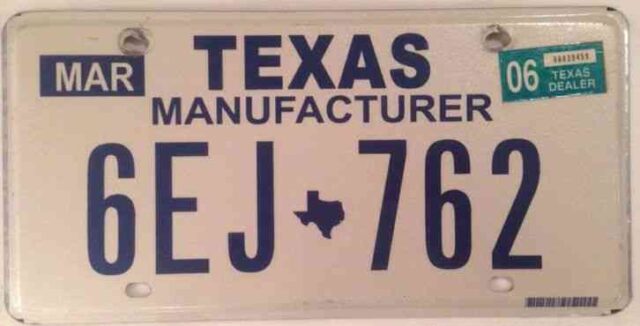
    I have a 30-frame clip of a car trunk opening which was filmed from behind the car. Part of the white license plate has white masking tape covering up portions of the plate put there by production. Using the picture as reference, the tape was put to cover “MAR”, “06 TEXAS DEALER” and “MANUFACTURER.” I’m tasked with removing the masking tape in post so that it just looks like that part of the plate is just blank. I tried doing this by using Clone Stamp but it does not look smooth and has to be done frame-by-frame because I can’t figure out a way to have it track properly throughout the clip. Any thoughts on the best way to do this? Thanks very much!!

    Wesley Post replied 5 years, 3 months ago 6 Members · 8 Replies
  • 8 Replies
  • Kevin Reiner

    February 5, 2021 at 9:37 pm

    Might be easier to replace the entire plate. Redo the plate in photoshop and then use either AE’s corner pin motion tracking or Mocha tracking to replace. Might have to match lighting and shadows. I’ve had to do this in the past and found this method to work best for me. Good luck.

  • Chris Voelz

    February 5, 2021 at 10:15 pm

    I agree with Kevin. My thought process would be to replace the whole plate. Motion tracking and rotoscoping will get the job done.

  • Wesley Post

    February 5, 2021 at 10:35 pm

    Great idea! That’s an interesting approach. I haven’t used that workflow much in the past as I am an editor who does some After Effects from time to time, but it isn’t my main skillset. If I were to go about replacing the entire plate, how exactly would I do that? The concept laid out makes sense, but I’m not sure how to execute that exactly. Thanks! 🙂

  • Eric Santiago

    February 5, 2021 at 11:54 pm

    Look for Mocha tutorials on that.
    Is it a locked shot?

  • Wesley Post

    February 6, 2021 at 12:22 am

    Okay I’ll look into Mocha – thanks! It is not a locked shot yet. The work I already did on it using the clone stamp may be enough for it to have fixed it, but I’m just prepping for if they reject that so I have a backup plan on Monday to address it. Hopefully they are good with the work and it’s a moot point 🙂

  • Michael Szalapski

    February 8, 2021 at 10:45 pm

    Even if you don’t replace the entire plate, you could use tracking data to put on a fixed thing.

    Alternatively, you could use AE’s relatively new Content Aware Fill for Video.

    And, if you’re on the latest version of AE, it even has light changing! Read more here: Use content-aware fill to remove unwanted objects from your video (adobe.com)

  • Brendon Murphy

    February 10, 2021 at 6:07 pm

    Mocha AE is built into after effects… that should do the trick for tracking the plate for replacement. I also posted a free AE script that helps make tracking even more precise: https://www.thepixeldump.com/single-post/pd-hipass

  • Wesley Post

    February 16, 2021 at 1:27 am

    Thanks guys! It seems Mocha did the trick perfectly. Much appreciated!

We use anonymous cookies to give you the best experience we can.
Our Privacy policy | GDPR Policy