Creative Communities of the World Forums

The peer to peer support community for media production professionals.

Activity Forums Adobe After Effects How to remove a Spot/Flare from the face

  • How to remove a Spot/Flare from the face

    Posted by kococinaski Ghazaryan on July 31, 2023 at 4:16 pm

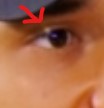
    Hi, I have a footage where there is a small lense flare right on the face of the protagonist, I have tried content aware fill, it partially works but not always when the flare is on the protogonist’s eye. Do you have any advice on how to solve this problem? It is shot on a tripod and the flare does not change the position, but the protogonist does.

    Thank you very much for your help!

    Greg Gesch replied 2 years, 9 months ago 3 Members · 2 Replies
  • 2 Replies
  • Hector Vera

    July 31, 2023 at 7:07 pm

    Is that screenshot you provided a still image or from a video? Depending on what the answer is, since its a very small lens flare, I would probably try to the Eyedropper tool to get colors similiar to the skin tone of the character near its eyes and try to fill the lens flare with at least 2-3 different color tone so when you look at it from afar, it would still look mostly natural and not notice the flares, just make sure the color tones are close to what it is right outside the flare. But that would be mostly possible in photoshop if its a still image you are showing us. Should work similiarly with After Effects but I cannot say for sure if its the same cause I am much more experience in the photoshop side.

    Here is a link I found that may help: https://helpx.adobe.com/after-effects/kb/eyedropper-clicking.html

  • Greg Gesch

    July 31, 2023 at 11:47 pm

    Hi. I would make a mask around the flare, slightly feathered then add a copy of your footage underneath and offset its position slightly – so that the “hole” in the upper layer is filled with the near area. You may need to change the position of the lower layer during the shot, but hopefully not.

We use anonymous cookies to give you the best experience we can.
Our Privacy policy | GDPR Policy