-
How to match Rotation of Position Keyframes and Trapcode Stroke Offset
I’ve been creating a circular motion of an emitting light, that moves forward on every beat thanks to Soundkey integrating function (Rising values depending on beat):
a = 150;
f = 1/30;
t = thisComp.layer("Keys").effect("Sound Keys")("Output 1");
x = a*Math.sin(f*2*Math.PI*t)+thisComp.width/2;
y = a*Math.cos(f*2*Math.PI*t)+thisComp.height/2;
[x,y]
I’ve linked this with the Trapcode particular, thus a nice particle trail emerges.
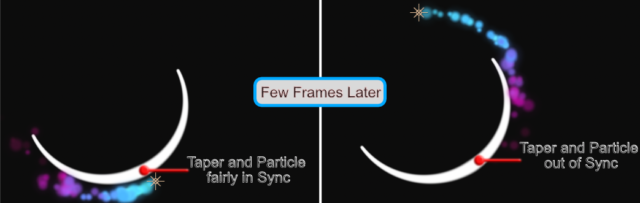
I could have also used Dan Ebberts speed method. Maybe I have to because here comes the issue: I’ve applied Trapcode stroke to the circle and want the taper to move with the particles.
Therefor I want to animation the offset, the reason being it drives the taper. However if I feed SoundKeys into the offset, they are out of phase:
Expression Offset:
1/30*2*Math.PI*thisComp.layer("Keys").effect("Sound Keys")("Output 1");Hence the angular momentum must be different. But why?
This might all seem abstract so I’ll attach a picture of what I am wanting to do: