

Activity › Forums › Adobe After Effects › How to get a shape to follow the path of a dynamically changing sine wave,
-
How to get a shape to follow the path of a dynamically changing sine wave,
Posted by Tim Tippets on May 1, 2023 at 10:22 pmHi everyone,
I’m using Wave Warp on a straight path to create a sine wave. I will change the sine wave height, length, etc over time and I would like a circle shape to follow the sine wave path as the height and length of the sine wave changes. Is it even possible using this method? Is there a better way?
Thanks!
 Boston Cainfra replied 3 years, 4 months ago 3 Members · 4 Replies
 -
4 Replies
-

Filip Vandueren
May 2, 2023 at 10:09 amHey Tim, doing it from a wave warp would take some guess work, and the result isn’t as crisp
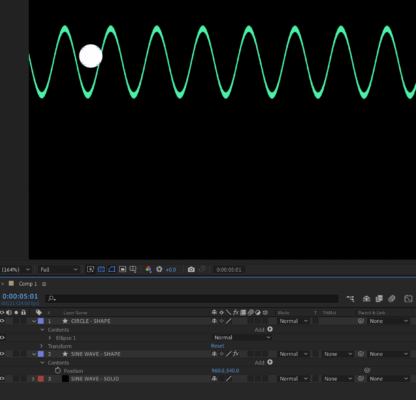
so I would personally do it with a shapelayer.Here is a project that does a reasonable approximation of a sinewave with a rather minimal amount of points using expressions:
-

Tim Tippets
May 4, 2023 at 1:31 amThat’s amazing! I’d like my circle to go just one direction or the other along the line of the sine wave. I’m on mobile but will get back and dig in soon to look at the expressions to see if I can tell what’s causing it to move relative to what the sine wave is doing. I’m not an expressions guy but I’m guessing it won’t be to hard to tweak?
Thank you a thousand times for giving me some direction to go in!
-
Filip Vandueren
May 4, 2023 at 8:26 amTim, I specifically did the Ball on a separate shape and let it calculate its own position on the sine wave (it’s actually a cosine wave, that made it easier to place the vertices on peaks an valleys), so the ball has an X-value you can manipulate.
You could also use pointOnPath() to get a position that’s a certain % along the way of the wave-path, but if you do this, then the X-position could change if the wave changes shape, 13% along the course of the path isn’t necessarily at the same X-coördinate for different phases/amplitudes/wavelengths…
-

Boston Cainfra
May 5, 2023 at 2:29 amCertainly, here is a summary of the steps:<div>
</div><div>Create a new shape layer with the Shape Layer tool and choose Ellipse.</div><div>Position the circle shape at the start of the sine wave path.</div><div>Apply the Wave Warp effect to the shape layer with Effect > Distort > Wave Warp.</div><div>Set the Wave Type to Sine in the Wave Warp effect settings.</div><div>Adjust the Height, Width, and Frequency settings to match the sine wave path on the other layer.</div><div>Apply keyframes to the Height, Width, and Frequency settings over time to match changes to the sine wave path.</div><div>Adjust the Position of the shape layer to match the position of the sine wave path as it changes over time</div>
Reply to this Discussion! Login or Sign Up