-
How to delete a layer based on its name?
Hi,
I am working on a math video and i figured it might be fun to write scripts to allow a visualization of what i explain in the video.
The short version might be enough to understand where the issue lies. However i go more into details in the Long Version:
Short Version:
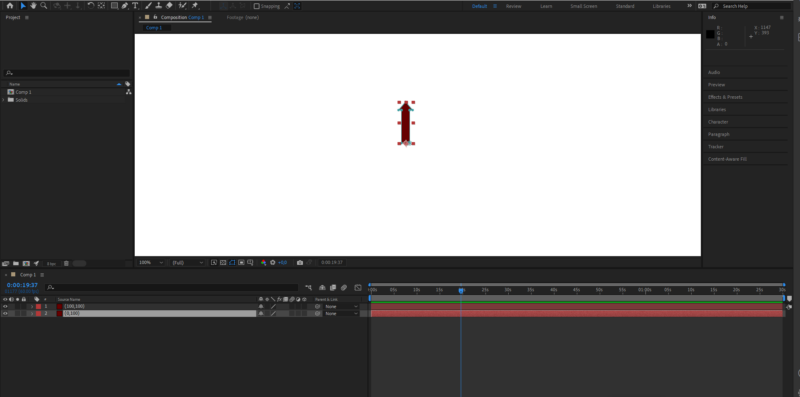
I want to create an arrow at a point (x1,y1). The arrow is a mask applied to a solid, made using Shape.vertices. I want the base of the arrow (see image) to coincide with the anchor point of the solid, so that i can rotate it without the base moving.
However, i can’t get that part right. Looks like i can’t understand how Shapes work with respect to the solids.
Long Version:
I am designing a vector object following the constructor below:
The center of the coordinate system is placed at (x1,y1). From there, I draw the vector with coordinates (x,y) by masking the solid to generate an upright arrow of length (base to tip) of sqrt(x^2+y^2) and then i rotate it by the necessary angle to get a vector with coordinate (x,y). To achieve that rotation, i need the anchor point of the solid to coincide with the center of the base of the arrow (like in the drawing).
I have been unable to place the shape a.
My end goal: is to be able to animate different vectors, draw grids (that are not necessarily orthogonal), lengthen and add vectors (lengthening by lenghtening the side vertices of the shape).
I am a mathematician, so the mathematical concepts shouldn’t be the issue here.
Here is the ugly code:
//The origin is supposed to be the place on screen where the arrow gets placed.
function Vector(x,y,origin,r,g,b) {
this.x = x;
this.y = y;
this.angle = -myAngle(x,y);
this.origin = origin;
velen = Math.round(length(x,y));
this.length = velen;
this.r = r;
this.g = g;
this.b = b;
this.lname = “(” + this.x.toString() + “,” + this.y.toString() + “)”; //So that the name layer matches the coordinates of the vector.
mySolid = comp.layers.addSolid([r,g,b], this.lname, 2*comp.width , 2*comp.height,1);
newMask = mySolid.Masks.addProperty(“Mask”);
Shape = newMask.property(“maskShape”).value;
this.large = 10; //The arrow base it twice as large
this.arrowwidth = 7; //
this. arrowheight = 20;
Shape.closed = true;
//The following line is me trying things out :
Shape.vertices = [2*origin – [this.large,0],2*origin + [this.large,0], 2*origin + [this.large,velen-this.arrowheight], 2*origin + [this.large + this.arrowwidth,velen-this.arrowheight], 2*origin + [0,velen],2*origin + [-this.large – this.arrowwidth,velen-this.arrowheight], 2*origin + [-this.large,velen-this.arrowheight],2*origin – [this.large,0]];
newMask.property(“maskShape”).setValue(Shape);
mySolid.property(“rotation”).setValue(this.angle – 90); //This is made so that the vector (100,200) point 100 pixels to the right and 200 up.
mySolid.property(“position”).setValue(origin);
//mySolid.anchorPoint.setValue(origin);
}
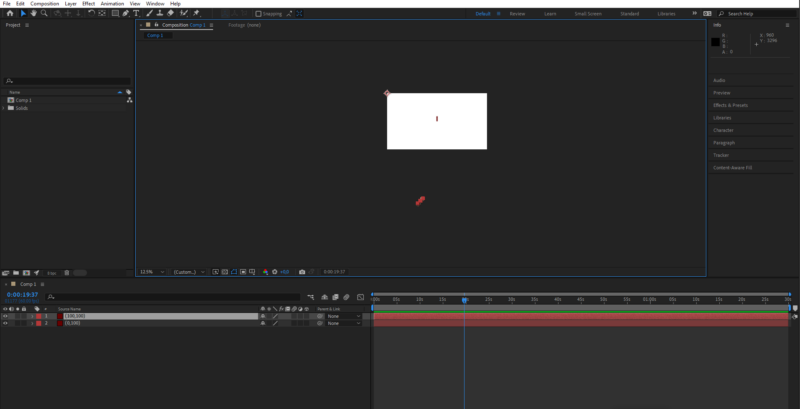
<div>This code works as long as the origin is the middle of the screen, but fails whenever i move the origin (the second image shows what happens when origin = [0,0] and the vector is supposed to be (100,100) (the arrow should be top left of the screen, pointing outside, 100 pixels to the right and 100 up).</div><div>
I am posting because this is driving me insane.
</div>