Creative Communities of the World Forums

The peer to peer support community for media production professionals.

Activity Forums Adobe After Effects Expressions How to create key frames delay

  • How to create key frames delay

    Posted by Rockey klide on March 31, 2026 at 6:05 pm

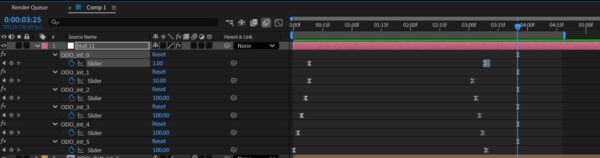
    Is it possible to create this with expression?
    i want to replace the key frames with expression
    on first layer so the first key frame will be at 25 frm then the layer under it at frm 20 layer under at frm 15 and so on
    im sure that possible using sourceAtTime and index or something like that
    but in the same expression i also want another key frames on the first layer the key frame is created for instance after a 5 second duration so this layer key frame is at 5 sec mark the layer under it at 5sec and 5 frm
    layer under at 5sec and 10 frm
    layer under at 5sec and 15 frm
    so first keyframes are ramp up from bottom layer and last keyframes are ramp down
    i have controller with duration slider effect = 5 (duration that will be the distance between first key frame and last on each layer)
    and delay slider = 5 (5 frames delay between each layer in my example it jumps 5 frm between each layer)
    see image for reference
    so
    Rockey klide replied 1 month ago 1 Member · 1 Reply
  • 1 Reply
  • Rockey klide

    April 1, 2026 at 7:24 am

    i see that its not key frames on every layer but all are on the same controller layer sliders but like i said there suppose to be a delay like in the image between each slider
    slider1 at 5 frm
    slider 2 at 10 frm
    and so on
    so they main goal is to have the same functions like the keyframes image but with expressions instead of the keyframes and then when i change the numbers for delay or duration on the controller it will effect all

We use anonymous cookies to give you the best experience we can.
Our Privacy policy | GDPR Policy