Creative Communities of the World Forums

The peer to peer support community for media production professionals.

Activity Forums Maxon Cinema 4D how select grup of polygons in c4d 2024?

  • how select grup of polygons in c4d 2024?

    Posted by Mauricio Barrientos on May 3, 2024 at 4:00 pm

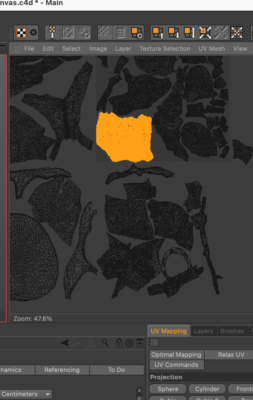
    Hi, I just want to know how to select a group of polygons in Cinema 4D 2024 that represents a specific piece in the complete 3D mesh. In other words, in Cinema 4D version 18, one simply had to click on that group of polygons and hold down the Ctrl key to automatically select that group of polygons, just as shown in the attached photo. But in Cinema 4D version 2024, this doesn’t work. Does anyone know how to achieve this in Cinema 4D 2024? Thank you

    Mauricio Barrientos replied 2 years, 1 month ago 2 Members · 2 Replies
  • 2 Replies
  • Kouraib Abdmalek

    May 4, 2024 at 8:37 am

    Hi Mauricio,

    I don’t know if this is exactly what you are looking for, but you could select the group of polygons by clicking on one of them twice without the need to hold Ctrl. I don’t know about R18 but that has been the case since R19. You can also use the phong break selection tool, as it makes it easier for you to choose a specific level of the group of polygons, as in the GIF below.

    I hope this helps you.

  • Mauricio Barrientos

    May 4, 2024 at 8:11 pm

    wow thats. impressive. …!!!

    thanks a lot !!!

We use anonymous cookies to give you the best experience we can.
Our Privacy policy | GDPR Policy