

Activity › Forums › Adobe After Effects › How do I make this shape disappear
-

Roberts Adi
January 2, 2021 at 11:26 amOthman Ahmed one more help please
https://www.youtube.com/watch?v=Z8tRpkCyULc&list=LL&index=1&ab_channel=ElenaRylova
You see the flip board Animation in the video, I want to create something similar but not with
flip boards. I want to use “Random Letters Into Text” like the letter animation from the video below. The same effect.
https://www.youtube.com/watch?v=hGiDtWOLDl4&ab_channel=HenryJohnston
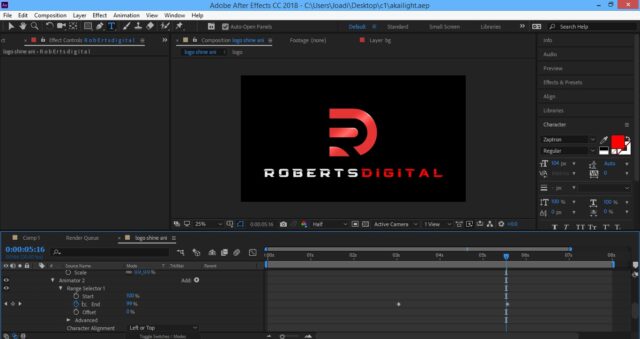
I want to use this effect for the text of my logo as you can see in the image below.
I have tried doing the same animation by following the second Youtube video above but I want to add extra effects
If you watch the flipper video, you will notice there are some brighter flippers that pass after every 4 flipper. Rather than a bright flipper in my random text animation, I’d like gaps to pass to the right with 7 letters in between them instead of 4. I’d like the gap to pass 4 times during the random letters animation. Same speed as flipper video.
After the random letters stops it should form the single word “R O B E R T S D I G I T A L”. I want the “D I G I T A L” to be in red as in the image below. I want the second to the last Gap of the four passing gaps and the last gap to have 7 red letters between them and the random animated letters should drive them to the right between the final 2 gaps and let the red letters end with the word “digital” in red while the remaining gap continue to travel to the right till it disappears. The “Roberts” should remain in white.
The final result should be as the image.
This is actually the second part of the first logo of shapes with the outline. Planning to merge them with a transition.
Please please can you do a recording so that I can follow your video example. Your video examples are often very brilliant and very easy to follow.
Here is the link to the AE file below:
You can delete my own random letter to text animation if you plan to use a different method.
I’d preferably like the animation to start from the left to the right starting with the first gap
Thx. I appreciate every help again
 Some contents or functionalities here are not available due to your cookie preferences!
This happens because the functionality/content marked as “Google Youtube” uses cookies that you choosed to keep disabled. In order to view this content or use this functionality, please enable cookies: click here to open your cookie preferences.
-

Othman Ahmed
January 2, 2021 at 1:40 pmBro Roberts, I don’t know what exactly you looking for, But I find this way works better with animation like yours. Hope you like it. And let me know!. ?
For more info, You can message me here: othmanqw12@gmail.com
-
Roberts Adi
January 2, 2021 at 3:25 pmOthman Ahmed
Please
I cant open After Effects file because mine is older than yours
I have to go to my friends house to try to use their latest AE like yours but they live far
Can you show me a video example so that I can follow?
please
take your time and any time it’s ready will be fine
I appreciate the help
Roberts
Thanks Again
-
Roberts Adi
January 3, 2021 at 12:39 amOthman Ahmed
I have finally been able to open the file so I will study it and get back to you
thx
-
Roberts Adi
January 3, 2021 at 4:04 pmHi Ahmed
Here is the video example of how the scramble animation path should be below:
https://www.youtube.com/watch?v=dHDOU8Ya1yw&feature=youtu.be&ab_channel=Stealthmann
Every square represents the random animating or scrambling letters
Only the text should be animated beneath the logo. Logo should continue to remain above the text
Thanks again
I appreciate the help
Reply to this Discussion! Login or Sign Up