Creative Communities of the World Forums

The peer to peer support community for media production professionals.

Activity Forums Adobe After Effects How do I do this? – Filling Arrows

  • How do I do this? – Filling Arrows

    Posted by Sean Lilley on May 1, 2024 at 1:33 pm

    Hi, I’m fairly new to after effects. What I need to do with this image is basically transform it into four different animations for a video:

    1. So I need the image to start dim – and then the red courage arrow lights up/fills up with colour – from bottom to top of arrow – then the centre purple circle lights/fills up.

    Then the same with the three other arrows.

    2. Whole image dim – orange connected arrow fills up – then the centre purple circle fills up.

    3. Whole image dim – green empathy arrow fills up – then the centre purple circle fills up.

    4. Whole image dim – blue authenticity arrow fills up – then the centre purple circle fills up.

    Hope that makes sense. Any help with this very much appreciated!

    Eric Santiago replied 2 years, 3 months ago 3 Members · 2 Replies
  • 2 Replies
  • Hector Vera

    May 1, 2024 at 4:00 pm

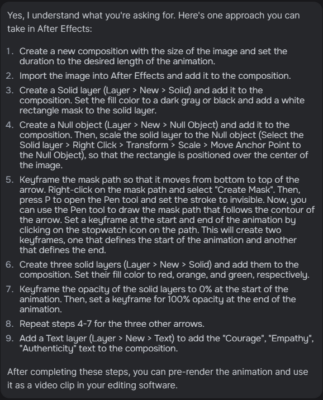
    It seems that you will need to create some different layers so you can add to the composition. I remember when I did animation in photoshop, you have to create multiple layers which at first the solid objects needs to start off DIM and slowly becoming brighter. I found these steps online that may give you an idea step by step on how to execute correctly your first animation on After Effects! Best of luck!

  • Eric Santiago

    May 1, 2024 at 6:06 pm

    I’ve done many of these in the past.

    Great thing about AE is you can create one and re-use in many ways.
    You will need to deal with masking parts as well.

We use anonymous cookies to give you the best experience we can.
Our Privacy policy | GDPR Policy