

Activity › Forums › Adobe After Effects › How can I mask 3d text?
-
How can I mask 3d text?
Posted by Shaun Carollo on August 26, 2013 at 12:01 amOk so, first timer here, compositing a 3ds Max animation for the architecture firm I work at. i have a bunch of 3d text overlays in the animation, and I need to know how to mask off the text so when you’re flying around, text that is on the floor appears as such, ie, masked off from the counter top above it. I’ve tried to look everywhere and everything I see mentions precomping everything, and I just don’t understand how that will improve my workflow. I have included a screenshot of what I’m working with now:
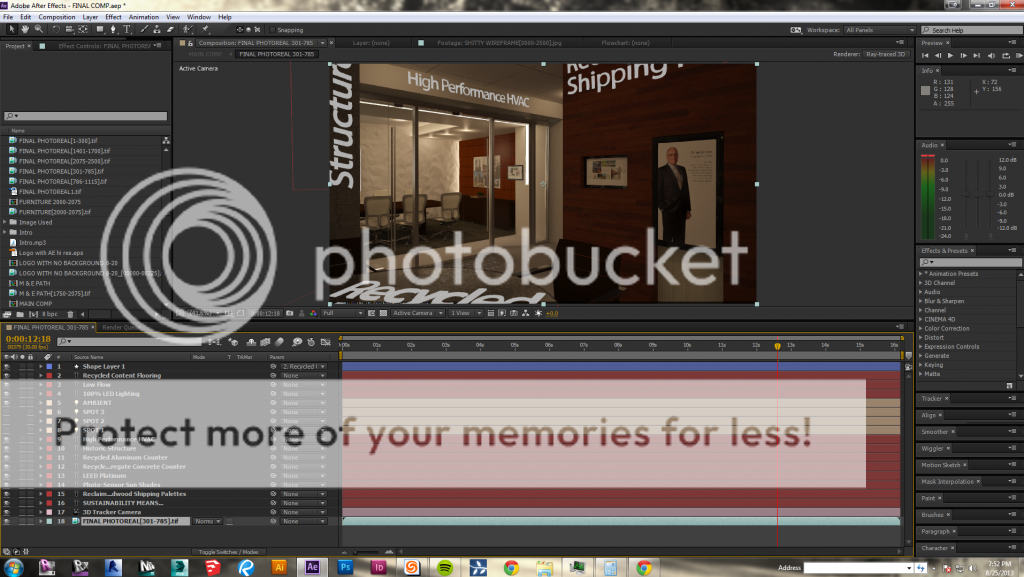
Can anybody help me out?
Darby Edelen replied 13 years ago 3 Members · 11 Replies -
11 Replies

-

Roland R. kahlenberg
August 26, 2013 at 2:00 amA different strategy is often used –
1) duplicate the backing plate and place it on top of the text layer
2) mask out parts of the duplicated backing plate such that the required parts are above the text layer.HTH
RoRKIntensive mocha & AE Training in Singapore and Other Dangerous Locations
Imagineer Systems (mocha) Certified Instructor
& Adobe After Effects CS6 ACE/ACI -
Roland R. kahlenberg
August 26, 2013 at 2:20 am[Shaun Carollo] “By backing plate, do you mean the background?
“Yes.
RoRK
Intensive mocha & AE Training in Singapore and Other Dangerous Locations
Imagineer Systems (mocha) Certified Instructor
& Adobe After Effects CS6 ACE/ACI -

Shaun Carollo
August 26, 2013 at 2:26 amOk, so assuming my background is the footage, a series of TIFF’s, then I would duplicate that layer and put it on top of all my 3d text layers? Then mask that to reveal the text underneath where I want it revealed?
Why is it that after I put the 3d camera into the scene, I can’t apply masks within the composition panel; there are no options under TrkMat anymore?
-
Roland R. kahlenberg
August 26, 2013 at 3:02 am1) duplicate backing plate or background footage
2) place the duplicate above the text layers
3) create masks around objects that should be overlaid over the text areas in order to create a realistic compositeI have never mentioned using a track matte because it is not necessary. Let’s stick to what I have suggested before you go an add in your own two cents into the mix. You can of course do so BUT only after ensuring that you have the most basic structure of the composite in place.
You really only need to try out the 3 steps for a few frames to check on the validity of the procedure.
Cheers
RoRKIntensive mocha & AE Training in Singapore and Other Dangerous Locations
Imagineer Systems (mocha) Certified Instructor
& Adobe After Effects CS6 ACE/ACI -

Darby Edelen
August 26, 2013 at 5:08 am[Shaun Carollo] ”
Why is it that after I put the 3d camera into the scene, I can’t apply masks within the composition panel; there are no options under TrkMat anymore?”Sounds like you’re working in a Raytraced 3D composition. Maybe switch back to the Standard 3D renderer if you don’t need raytracing. This is in Composition Settings > Advanced.
Also if you use Roland’s suggested workflow then Masks may do the trick and you won’t need to use Track Mattes.
Generally if I need to block out things I’m compositing into a 3D render I’ll use object passes or even a depth pass to matte the comp’d layers if I can get away with it.
Darby Edelen
-
Shaun Carollo
August 27, 2013 at 1:28 amThanks Darby and Roland.
I have a follow up question. I have two seperate passes of the exact same footage, one photoreal RGB, and one Alpha to mask out selected items. Why is it–and this is just my guess being new to AE; that when you use the 3D camera to track footage, when I bring in the alpha to matte, nothing is lined up anymore? Frame for frame, everything is off. How do I go about getting that done correctly? Or am I implementing a terrible workflow? I have attached an RGB image:

Basically, I have text that follows HVAC ducts as you orbit the scene, and I thought I would be able to highlight/make each system (HVAC and electrical) glow as that texts appears by using the alpha channel as a mask/track matte. Is that not possible?
-
Roland R. kahlenberg
August 27, 2013 at 4:30 amIt sounds like you’re describing two different issues –
1) matchframe error
2) getting the alpha to work as expectedFor (2) I suggest that you create a composition for the RGB and Alpha layers. Place the RGB layer below and set it to use the above, Alpha, layer as an Alpha Track Matte. Then nest this composition into your ‘final’ comp.
For (1), I am assuming that you have made this sequence a 3D layer in AE. Not knowing more, I am assuming that this sequence should be left as a 2D layer. If this doesn’t work, then you will have to let us know more on the following –
(a) the tracking or background plate/layer; provide at least an image (b) how was the HVAC created in relation to the tracking plate
(c) what you have done to both these layers once you brought them into AE.Cheers
RoRKIntensive mocha & AE Training in Singapore and Other Dangerous Locations
Imagineer Systems (mocha) Certified Instructor
& Adobe After Effects CS6 ACE/ACI -
Shaun Carollo
August 27, 2013 at 3:33 pm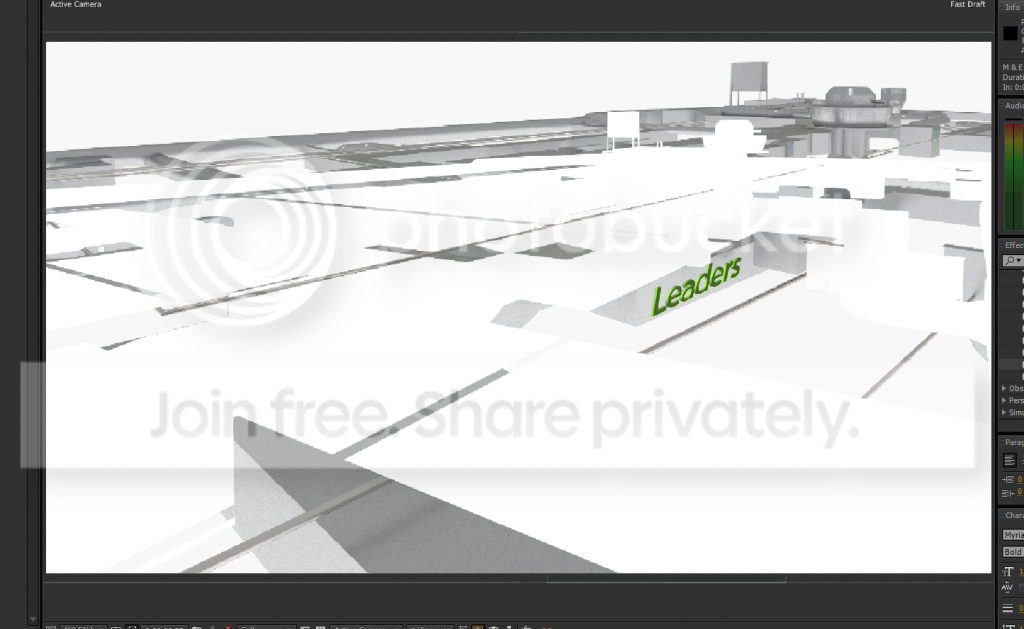
All layers in this comp are 2D layers, but I used the track camera under animate so I could place text along the HVAC runs. Frame for frame when opened up in Ps, these images line up, but when placed into the comp, the alpha layer is not lined up as seen above–I’m assuming because of the camera tracking. What are my options to get this all to line up so I can TrkMat?
-
Roland R. kahlenberg
August 28, 2013 at 1:02 amTracking should not affect the background plates – the RGB and Alpha layers should still be 2D layers. You should be able to easily check the validity of these two layers in AE before you track. If they line up perfectly then post-tracking should not affect the layers as long as you leave them as 2D layer.
If things are still funky, then post screencaps of your Timeline –
a) before tracking – I’d like to see how you’ve placed these two layers in their own precomp and applied the track matte procedure as advised in an earlier postb) post-tracking – I’d like to see how you’ve structured your layers
HTH
RoRKIntensive mocha & AE Training in Singapore and Other Dangerous Locations
Imagineer Systems (mocha) Certified Instructor
& Adobe After Effects CS6 ACE/ACI


Reply to this Discussion! Login or Sign Up