Creative Communities of the World Forums

The peer to peer support community for media production professionals.

Activity › Forums › Adobe After Effects › How can I link my camera to a moving object?

  • Graham Quince

    March 24, 2021 at 9:37 am

    Hi Stephen,

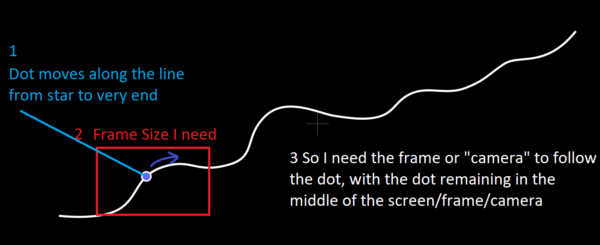
    hopefully it’s just me, but I can’t see the image you uploaded. But I think I have a solution anyway.

    Expand the dot on the timeline so you can see the position, then expand the camera transform properties and use the Point of Interest pickwhip to link the camera’s POI to the dot’s position. This means the dot will always be in the center of the screen.

    If your dot is parented, then you might need to create a Null Object and set its position using this expression:

    L=thisComp.layer("Dot");

    L.toWorld(L.anchorPoint);

    This gets you the comp coordinates for a parented object. And then use the Camera POI on the null layer. (Thinking about it, you could probably just use the above expression on the Camera’s POI instead of bothering with the null.)

We use anonymous cookies to give you the best experience we can.
Our Privacy policy | GDPR Policy