Creative Communities of the World Forums

The peer to peer support community for media production professionals.

Activity Forums Adobe After Effects How can I get moving still images to not blur when moving?

Tagged: 

  • Eric Santiago

    April 17, 2023 at 2:05 pm

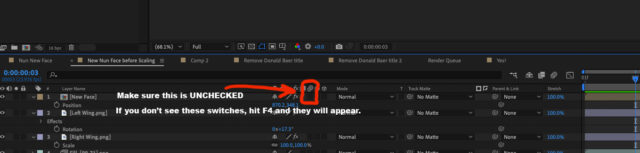
    Is the motion blur toggle (on) on that layer?
    Shut the motion blur option off on that composition.

    Are you using a 3D Camera?

    DoF on?

  • Jim Dodson

    July 20, 2023 at 11:25 pm

    Eric is correct – if you can’t see the motion blur switches, press F4.

  • John Cuevas

    August 3, 2023 at 2:55 pm

    Your first frame the image is exactly on whole number coordinates. The 2nd frame, they are at .4 and .5 from whole numbers. Because of that AE has to interpolate the image, causing blurry frames. You could try adding an unsharp mask to your eyes on blurry frames if it’s too distracting. See example project.

We use anonymous cookies to give you the best experience we can.
Our Privacy policy | GDPR Policy