

Activity › Forums › DSLR Video › How are people doing DSLR audio?
-
How are people doing DSLR audio?
Posted by John Bauwens on September 6, 2013 at 3:28 pmSo how is everyone doing DSLR audio currently? I just got to the party and was looking for a way to run XLR mics into a T3i, preferably with sync sound. I was checking out the tascam dr-60d. Are there any other methods I should be looking at?
John Doggett-williams replied 12 years, 2 months ago 8 Members · 19 Replies -
19 Replies
-

Rob Manning
September 6, 2013 at 5:37 pmBuy Rich Harrington’s book, “From Still to Motion”.
https://library.creativecow.net/harrington_richard/DSLR-Sync-Sound-Workflow/1
Search dual source audio on the web, there should be lots of tutorials.
In the case of a two step box like the Zoom, TASCAM, Sony, one can feed the line level to the camera, but, there are gain structure considerations in some cases and Sescom offers several buffered cables specific to the gear being used for connectivity.
https://audio-video-supply.markertek.com/search#w=sescom%20dslr
HTHs
Rob Manning
-

John Bauwens
September 6, 2013 at 5:50 pmThanks that video is pretty great. I did a good bit of research before, and just wanted to check what other people were doing currently and fish for any input before I committed to something.
You can also overcome the AGC issues with a piece of free firmware called Magic Lantern for the T3i. Bought four of those things for that reason.
-
Rob Manning
September 6, 2013 at 8:34 pmI’m sure you have a grasp, dual source audio is requisite and synched after the fact with either a slate or using Plural Eyes (Red Giant).
It is functional and accomplishes the task but basic compared to time code camera synch on higher end set ups.
The larger issues once gain and source are ironed out is mic placement, body pack, boom and operator, off camera stands, subject movement etc.
Rich Harrington and others have a lot of stuff online, Adobe, Lynda, Video Cop and of course here at CC.
Search the tutorials links, I’m sure a lot of stuff is already in place.
HTHs
RM
-

Guy Mcloughlin
September 7, 2013 at 5:41 pmI shoot presentation and training videos, and I’ve been using XLR audio adapters ( BeachTek and JuicedLink ) to feed audio to my DSLR cameras for several years now. The audio quality is very good, especially with my Panasonic GH2/GH3 cameras.
I used to shoot with a Canon 60D, but switched to Panasonic GHx cameras a couple of years ago because they produce a higher quality video and audio recording. The GH3 has a noise-floor equivalent to a Zoom H4n recorder, which is about -63 dB.
The key to obtaining high quality DSLR audio is to feed your camera a strong audio signal ( -30 dB to -20 dB ) and set your camera’s audio level as low as possible. This means you need to use a good external mic pre-amp like a JuicedLink Riggy unit or a professional mixer like the Sound Devices MixPre-D.
You can also use Sennheiser G3 UHF wireless systems, and feed the receiver output directly into your camera. The receiver output is adjustable over a wide dB range, so you may have to do some tests to determine the best settings for your camera. With my GH3 I use -18 dB on the transmitter and -6 dB on the receiver with the GH3 audio level set to 1.
For narrative film-making I use a dual system with a Sound Devices MixPre-D that is then fed to a Sony PCM-M10 recorder that is tucked into the front of the audio bag. Everything is slated, which makes it very easy to sync the audio tracks with the camera video.
-
John Doggett-williams
September 7, 2013 at 11:42 pmGood answer Guy, have you used the Zoom H4n recorder directly into the GH2? I have done so and find the hiss (on the camera recording) annoying. Also, when using the GH2/3’s do you ever zoom? I’m not great with manual zooming.
John Doggett-Williams
http://www.fineeyeproductions.com -

Bill Bruner
September 8, 2013 at 10:20 amI used to run my mics into a Tascam DR-40, and then into my cameras with a $27 Sescom LN2MIC-TASD100 cable.
But I gave that up when I discovered that with decent quality pro mics, gain control and the GH2‘s (and now the GH3‘s) preamps, I could get rid of noticeable hiss and room noise.
Now I run sound from self-powered pro XLR mics directly into the camera with a $17 Hosa MIT-156 XLR to 3.5mm transformer/adapter. No more forgetting to turn the recorder on, no more ungainly rigs like this:
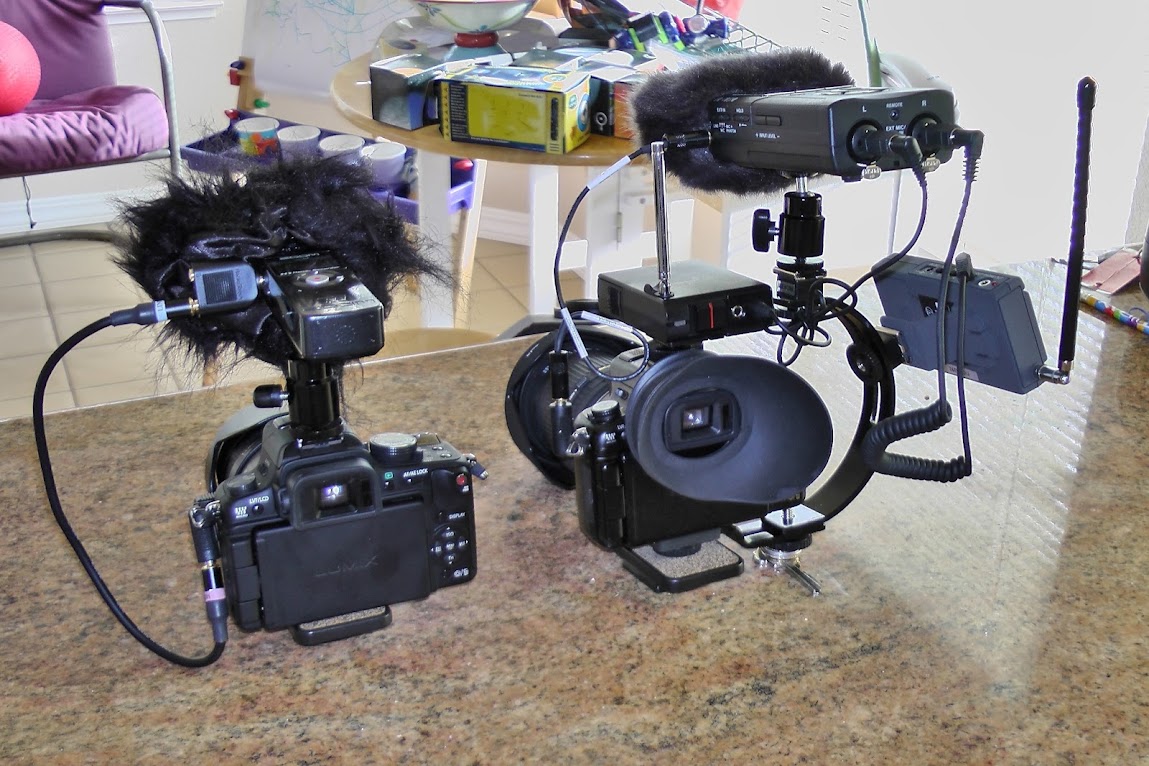
Instead, the mic plugs directly into the camera, like this:

And this:
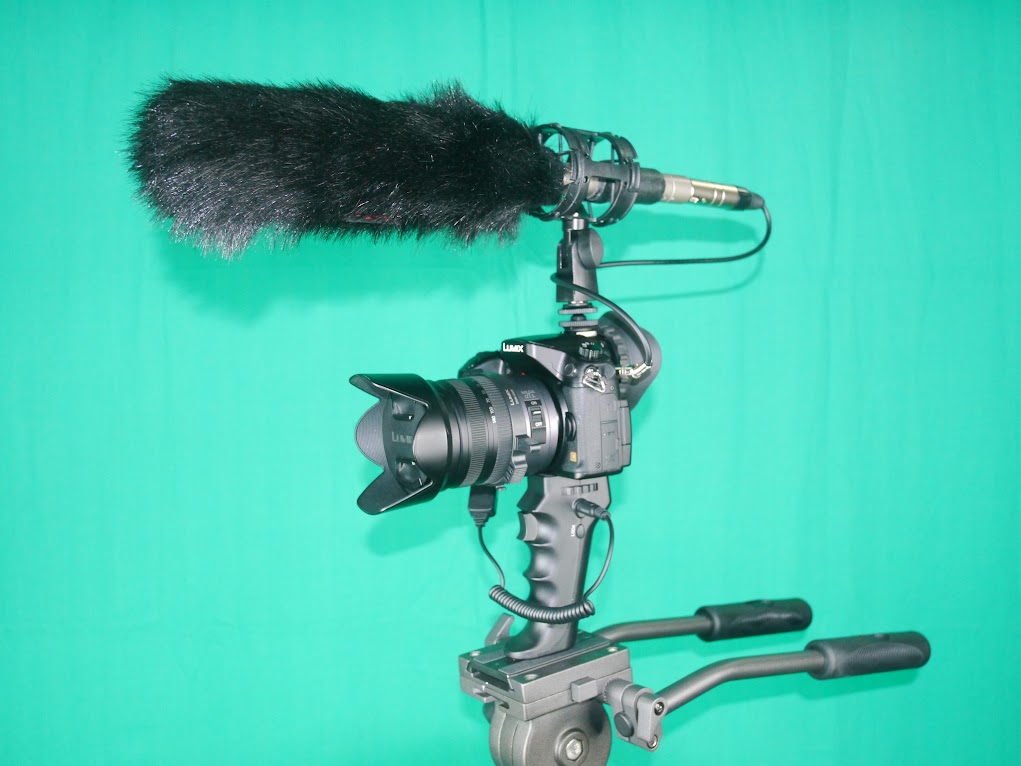
A lot simpler.
Hope this is helpful,
-
Guy Mcloughlin
September 9, 2013 at 2:37 pm[John Doggett-Williams] “have you used the Zoom H4n recorder directly into the GH2?
I haven’t had great results with the Zoom H4n compared to using an actual pre-amp. The JuicedLink Riggy pre-amp is one of the least expensive ways of obtaining high quality audio for your DSLR camera.
[John Doggett-Williams] I have done so and find the hiss (on the camera recording) annoying.
You must set your camera’s audio level as low as possible and then feed your camera a strong signal to achieve “noise free” audio.
[John Doggett-Williams] Also, when using the GH2/3’s do you ever zoom? I’m not great with manual zooming.”
I don’t own any parfocal zoom lenses, so my focus goes out every time I zoom. Very few DSLR lenses are parfocal, so unless I want to rent a real PL mount Cine zoom there’s no point.
I might buy the new Panasonic 14-140mm zoom just because it’s one of the few parfocal lenses in the Panasonic lens line-up.
-
John Bauwens
September 10, 2013 at 9:46 pmThanks for everyone’s input. Last question I have is in regards to the post production of the whole thing. While I appreciate the input about the Panasonic line, I have lenses and such that make it tough.
So I can run one or two xlr mics into whatever box I end up getting (I like what I hear about the Tascam DR-60D) and I can run a 1/8 inch line into the camera body? What does that send to the camera?
-
Rob Manning
September 12, 2013 at 7:47 amH4N for example, a stereo signal (around 10 kΩ impedance) set independently with the volume control which would be used for headphones otherwise -10dB consumer (versus +4dB) if there is not a separate line output.
As noted, noise floor and gain structure are task one from source (line) and on camera input.
A closed back set of headphones is recommended to gauge playback.
RM
Reply to this Discussion! Login or Sign Up