Creative Communities of the World Forums

The peer to peer support community for media production professionals.

Activity Forums Adobe After Effects Expressions Highlight Text by ** Symbols

  • Highlight Text by ** Symbols

    Posted by Ben Sterr on July 14, 2024 at 2:42 pm

    Hi all,

    i have to modify a setup, which allows the user to highlight one or multiple words by adding “**” before and after. The original setup works by adding “=” ( For example: This is a =Highlight=). On a separate Text Layer, everything outside those two “=” characters is then faded out by an expression selector and a specific font is chosen to generate a colored box behind the marked text (in this example only behing the word “Highlight”). This setup works pretty good so far, but i cant find a way to mark the words to be highlighted with "**" (two characters) instead of "=" (only one character). Anyone any idea how to modify the expression to make it work? i tried changing the if statement to for if (txt[i] == "*" && txt[i+1] == "*" ), but this doesnt seem to work as expected.

    const txt = thisComp.layer(“Master_Text”).text.sourceText.replace(/\n|\r|\u0003/g,””);

    var txt_highlight = false;

    var count = textIndex;

    for (i = 0; i < count; i++) {

    if (txt[i] == “=”) {

    txt_highlight =! txt_highlight;

    count++; i++;

    }

    }

    if (txt_highlight == 1){

    0;

    }

    else{

    100;

    }

    Brie Clayton
    replied 1 year, 10 months ago
    4 Members · 18 Replies
  • 18 Replies
  • Hector Vera

    July 15, 2024 at 4:25 pm

    Hello Ben! Hope you are doing fine. So one way that you can modify the expression to mark the words to be highlighted with “__” (two characters) instead of “=” (only one character) would be to use the following logic:

    1. Replace all instances of “=” with “__” in the source text string.
    2. Split the source text string into an array of individual words.
    3. Loop through the array of words, and for each word, check if it is surrounded by two instances of “__”.
    4. If a word is surrounded by two instances of “__”, toggle the “txt_highlight” variable to mark the word as highlighted.
    5. Update the display of the Text layer based on the value of “txt_highlight”.

    Here’s an example of how this expression would look like in code:

    // Replace all instances of “=” with “__” in the source text string

    const txt = thisComp.layer(“Master_Text”).text.sourceText.replace(/=/g, “__”);

    // Split the source text string into an array of individual words

    let words = txt.split(” “);

    // Loop through the array of words, and for each word, check if it is surrounded by two instances of “__”.

    for (let i = 0; i < words.length; i++) {

    if (words[i].includes(“__”)) {

    // If a word is surrounded by two instances of “__”, toggle the “txt_highlight” variable to mark the word as highlighted

    txt_highlight = !txt_highlight;

    if (!txt_highlight) {

    return 0;

    }

    }

    else {

    // If a word is not surrounded by “__”, update the Text layer based on the value of “txt_highlight”

    if (txt_highlight) {

    100;

    }

    else {

    0;

    }

    }

    }

    With this expression, you should be replacing all the “=” in the source text string with “__” and highlight all the words that are surrounded by these characters.

    1. Ben Sterr

      July 15, 2024 at 4:41 pm

      Hi Hector! Thank you VERY much for help and your effort. Unfortunately i get several error messages for “invalid or unexpected token”, when i paste the code into the Expression Selector. Even at the first line defining the source text. If i relink it to my Naster Sourxe Text, i get antoher error message at the line, where it splits the text into words.

    2. Julian Chojnacki

      July 15, 2024 at 9:16 pm

      Hi Ben,

      try the following on your expression selector, but based on words (which is more efficient than looping over each char):

      const wrapChars = "**"; // Insert your desired wrap character(s)

      const L = thisComp.layer("Master_Text");

      const controlText = L.text.sourceText.value;

      const currentWord = controlText.split(/\s+/)[textIndex - 1];

      const escapedWrapChars = wrapChars.replace(/./g, "\\$&");

      const regex = new RegExp(^${escapedWrapChars}([^${escapedWrapChars}]*)${escapedWrapChars}$);

      regex.test(currentWord) ? 0 : 100;

      You can change the wrapChars to any character(s) if you want to reuse the expression for other setups.

      Make sure to remove all instances of your wrapChars on your display layer’s source text using something like this:

      thisComp.layer("Master_Text").text.sourceText.value.replaceAll("**", "");

      But I assume you already have something like that in place 🙂

    3. Julian Chojnacki

      July 15, 2024 at 9:34 pm

      Just noticed that the formatting messed up the regex. You’ll need to add a backtick ` after the opening parenthesis and before the ending parenthesis (marked by X):

      const regex = new RegExp(X^${escapedWrapChars}([^${escapedWrapChars}]*)${escapedWrapChars}$X);
    4. Ben Sterr

      July 16, 2024 at 5:28 am

      Hi Julian, thank you very much for your help! Unfortunately it doesn`t seem to select any of marked word(s). My text is a paragraph text (it has to be), could this be an issue?

    5. Julian Chojnacki

      July 16, 2024 at 9:31 am

      Shouldn’t be – can you send over a screenshot of your setup/project file?

    6. Ben Sterr

      July 16, 2024 at 10:16 am

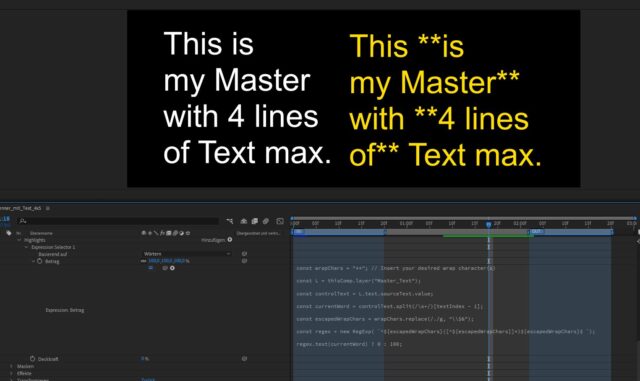
      Hi Julian! Unfortunately i can not share the original, but here is a comparable Dummy Setup. The marked words on the right should appear in yellow on the left (behind the original white text), but it seems like the opacity of all characters / words is set to 0.

    7. Julian Chojnacki

      July 16, 2024 at 10:21 am

      Ahh, I see you got some spaces in between the parentheses of the regex. Getting rid of them should fix it!

    8. Ben Sterr

      July 16, 2024 at 10:29 am

      Thanks, unfortunately it does not 🙂 It still seems to set the Opacity to 0 overall.

    9. Julian Chojnacki

      July 16, 2024 at 12:19 pm

      Sorry Ben! Looking back at your screenshot I realized that I misunderstood your initial request. My code would only work for single words wrapped in asterisks, not multiple words in a row.

      Try this (based on characters):

      const L = thisComp.layer("Master_Text");

      const txt = L.text.sourceText.value.replace(/\n|\r|\u0003/g, "");

      const wrapChars = "**"; // Insert your desired wrap character(s)

      const wrapLength = wrapChars.length;

      let isWrapped = false, i = adj = 0;

      while (i <= textIndex - 1 + adj) {

      if (txt.substr(i, wrapLength) == wrapChars) {

      isWrapped = !isWrapped;

      adj += wrapLength;

      i += wrapLength;

      } else {

      i++;

      }

      }

      isWrapped ? 0 : 100;

    Page 1 of 2

    We use anonymous cookies to give you the best experience we can.
    Our Privacy policy | GDPR Policy