Creative Communities of the World Forums

The peer to peer support community for media production professionals.

Activity Forums DaVinci Resolve Help with Fusion Composition DR17b7

  • Help with Fusion Composition DR17b7

    Posted by Doug Jackson on January 31, 2021 at 2:36 pm

    Hi All;

    I’m a fairly new DR user, and am having an issue with a Fusion composition on the timeline after reopening a Project.

    I was working on a Fusion Composition with a couple of PNG media files, some Text+ nodes, with a few Merge, Resize, Transform nodes. It is about 19 seconds.

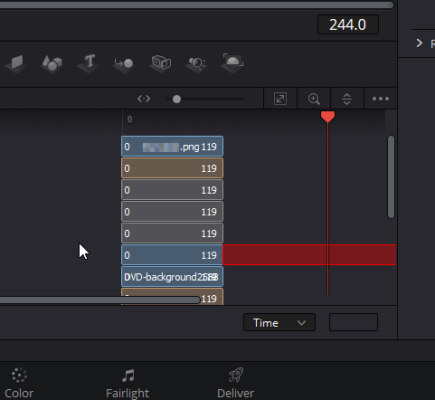
    When I reopened the project, the Fusion Composition goes black 120 frames in. Fumbling around trying to figure out why, I discovered the ‘MediaOut1’ node is ‘split’ at frame 120 and the remainder is red when I look at the Keyframe editor. Trying to resize does not work.

    Any thoughts?

    Regards,

    –Doug

    Doug Jackson replied 5 years, 3 months ago 2 Members · 4 Replies
  • 4 Replies
  • Doug Jackson

    January 31, 2021 at 8:11 pm

    Well, I’ve been trying to dig into what was wrong with my Fusion Composition and kept monkeying around with things until I’ve found my own solution.

    I can’t really believe that what I discovered would be the ‘expected’ behavior but who knows.

    What I believe had happened was somehow several nodes got ‘locked‘ at a shorter duration than the Fusion Composition.

    After spending some time in the DR16 manual in the Fusion section and looking at my screenshot, I should have been able to ‘resize’ the events in the Keyframe editor. And some of the other objects in my comp I could resize, but not all.

    And the tail of the ‘MediaOut1’ was red because I think Fusion was saying “But you told me the duration for output was supposed to be this long”. (Try looking at a ‘Blank’ Fusion Comp with only a ‘MediaOut1’ node in the Keyframe editor.)

    In my node tree, the ‘Merge2’ node was connected to the ‘MediaOut1’. So I disconnected them. I could then resize the event in the Keyframe editor. I reconnected and I then I could still resize.

    So, if you can’t resize a duration for a node, try disconnecting some of them.

    Regards,

    –Doug

  • Doug Jackson

    January 31, 2021 at 8:31 pm

    Aaarghh! Except, the Fusion Composition now does not show when I switch back to the ‘Edit’ page! I mean, it’s on the timeline but it does not ‘render’ in the viewer. But I can switch back to the Fusion page and preview ‘MediaOut1’ in the viewer.

  • David Baud

    February 1, 2021 at 6:32 pm

    “MediaOut1” node correspond to the output of the Fusion page. This is the result of your compositing work in Fusion which is transferred back to the EDIT page. Most of the time you do not want to modify this node but it needs to be the last node of your composition work, and it needs to be connected if you want your FX to appear in the EDIT page.

    I would recommend you spend some time reading some of the training guide provided by BMD on their training page. I believe it will help you to understand how the Fusion page works and the nodes structure. Here is the link:

    https://www.blackmagicdesign.com/products/davinciresolve/training

  • Doug Jackson

    February 1, 2021 at 7:41 pm

    Thanks for that link. Much to learn.

    I recreated my Fusion Composition from scratch and it all worked as expected the 2nd time.

    Regards,

    –Doug

We use anonymous cookies to give you the best experience we can.
Our Privacy policy | GDPR Policy