Creative Communities of the World Forums

The peer to peer support community for media production professionals.

Activity Forums Apple Final Cut Pro Legacy Help recapturing and uprezing a DV sequence to 1080p23.97 F900 footage with J-H3

  • Help recapturing and uprezing a DV sequence to 1080p23.97 F900 footage with J-H3

    Posted by Blinkofaneye on December 9, 2006 at 3:22 pm

    Hello all,

    I am working on a feature and i seem to have worked myself into a bit of a situation. I am using the Sony J-H3 hdcam deck and I need to uprez some 1080p 23.97 Sony f900 footage. I initially captured everything via the firewire downconvert out as simple DV footage with the assumptive pretext that i could simply go back later and recapture it all as 1080. So now that i am done cutting and it is time to take that step i am stymied. I have my J-H3 connected via single HDSDI
    (https://www.bhphotovideo.com/bnh/controller/home?O=Search&A=details&Q=&sku=271937&is=REG&addedTroughType=search)
    cable into my multibridge extreme using firewire for deck control. I first wanted to test out and see which capture settings worked, My first tries were the 1080i59.97 and 1080i50 dvcprohd settings. I chose these because i could not get the video to show up with the 1080p23.97 setting which i expected to use. These captured fine and looked good, i then tried to do some of the 10 and 8 bit 1080i59.97 and 50 settings and all i get is dropped frames and timecode errors. So i decided to go with the “dvcprohd settings” First of all i used this (https://www.kenstone.net/fcp_homepage/offline_rt.html) as a guide in my first attempt as i’ve seen Shane recommend it to people. This brings me to another issue, the above-mentioned walk through is a bit dated and there are some things in the media manager etc. that are new and uncovered by it. I am not sure if it still pertains as I am confused how FCP translates an SD sequence with an SD aspect ratio to and HD sequence with an HD aspect ratio. Anywho, I attempted to follow the tutorial but under the create offline option in the media manager there is no “dvcprohd” setting just the options that would not work in my earlier tests. So obviously when the new uprezed sequenced is created i cannot capture anything as it just errors out saying dropped frames or timecode issues (which are not truly there as i already captured all of this as dv with time code and no issues). So… please tell me it is that bloody cable or I need a rs422 cableor something like that, please any thought would help. Sorry for bad grammar and what not, too much coffee, no sleep, and lots

    Jeremy Doyle replied 19 years, 5 months ago 5 Members · 9 Replies
  • 9 Replies
  • Oliver Peters

    December 9, 2006 at 4:41 pm

    Matthew,

    Not sure about all the various issues you are having, but here are some thoughts and things to follow.

    1. If you are trying to capture as HD 1080i/59.94 then you need to set the JH3 deck’s menu setting (System) to 23.98PD. This will add pulldown to your 23.98 footage and give you a video stream that is 29.97fps with 2:3 pulldown frames added. This should match your downconverted DV tapes.

    2. Use RS422 control for the JH3 deck. DO NOT use FW control for this VTR when you are capturing via HD-SDI.

    3. To properly “uprez” follow these steps WITH YOUR LOW RES MEDIA CONNECTED.
    a) Duplicate your final sequence and choose “make sequence clips independent” on that copy. (If your audio is clean from the DV, i.e. it went 48K digital all the way, then
    you can delete the audio tracks from the copy and continue to work video-only.)
    b) On the copy, go into Media Manager and follow the steps for “Create Offline”. Don’t worry about changing sequence settings.

    4. When you have changed your project to a new one (“Create Offline”), you now should have a new sequence and a bin of new master clips. These should all be offline. The easiest thing to do is to change your sequence settings (new) to an HD preset that corresponds to 1080i/59.94 (29.97fps). This will most likely be a preset installed with the Blackmagic Design installation of the Multibridge Extreme. You can use DVCPROHD, 8-bit uncompressed or 10-bit uncompressed. The former is compressed and may or may not be visually acceptible, but works with a pair of SATA drives (striped). The latter two are uncompressed and need a larger array.

    5. Now you are ready to batch capture the master clips. Open the capture tool and set the capture settings to the correct preset for 1080i to match your sequence settings. Again this is probably a BMD preset. Highlight the clips to batch capture and make sure you click the button to ignore logged settings. This way the batch will follow the settings you established in the capture tool. The master clips in the bin will be updated when the batch capture is complete.

    6. When done capturing, your sequence should have relinked automatically and nothing should be offline. No rendering should be needed unless there are filters or effects.

    Sincerely,
    Oliver

    Oliver Peters
    Post-Production & Interactive Media
    Orlando, FL
    http://www.oliverpeters.com

  • Blinkofaneye

    December 9, 2006 at 5:17 pm

    Would the firewire deck control be the issue behind my not being able to capture anything other than dvcprohd without timecode and dropedframe errors? That is one of my biggest issues and may be due to the internal deck setting you mentioned? Is 1080i59.97 the correct, or most advantageous, way to capture f900 footage shot at 1080p23.97? I have tried the 1080p23.97 easy setup and i cant even get video to play through, where as the 59.97 setup plays through. I am having the issue that my newly uprezed sequence is being automatically conformed back to 4:3 to match the original letterboxed dv sequence. Here is my work around i devised and tested but shall try your steps and post back my results, thank you SO much for your reply!

    SO, i have this DV sequence of downrezed letterboxed footage that is my feature. I needed to take that and recapture it all in the original true 1080 hd quality and aspect ratio. I can only get capture to work with the dvcprohd versions of the various codecs, so i decided to use these. When i select my test sequence and enter the media manager to create and offline sequence there is not(i have no idea why there isn’t) an option for a dvcprohd sequence, just jpeg, 8but 10bit and 10bit 4:4:4. So this is issue #1, my solution, simply select 8 bit 1080i59.97, and create the offline. Once i am in my new project i change back to the easy setup of 1080i59.97dvcprohd and commence my capture. This brings me to issue #2 when capture is completed FCP has taken the HD aspect footage and automatically conformed it with the distort tool to 4:3 to match the original DV footage.(that and i have dvcprohd footage in a 8bit sequence that is all red.) So since i am already in my dvcprohd easy setup i just create a new sequence, apple+a then apple+c in the 8bit sequence and then apple+v in my dvcprohd sequence. Now it is still squeezed up to 4:3 so apple+a right click remove attribute, and uncheck distort. BOOM uprezed sequence, granted in a convoluted and i imagine semi dangerous way. Please tell me there is an easier way, or from my above post you can tell what i am doing wrong. UGH

  • Blinkofaneye

    December 9, 2006 at 5:21 pm

    Oh and sorry if i was confusing, they are hdcam tapes that were captured over a hardware downconverted firewire on the Sony J-H3 deck. Does that affect your statement in “#1” or am i just confused?

  • Blinkofaneye

    December 9, 2006 at 5:49 pm

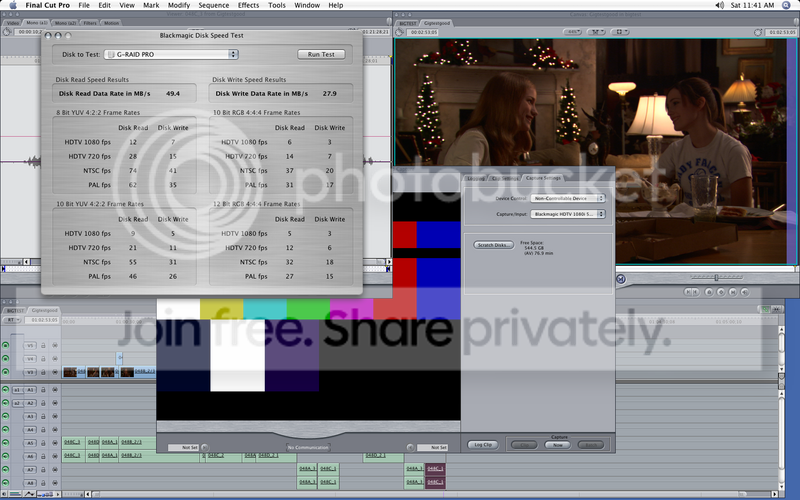
    So under the assumption the firewire might be what is hindering me from capturing anything other than DVCPROHD codec footage i did “uncontrollable device” in conjunction with the 1080i59.97 8bit capture preset. Same deal drop frames. Now i am running a FW800 gtech pro 5 disk sata array and the black magic design disk speed test clocks it at being able to handle 7 streams of 8bit-
    Image hosted by Photobucket.com

    So now i am perplexed as to the cause of my dropped frames… are there a difference between sdi and hdsdi cables? The link above is to the BH cable i am using now so… I am perplexed.

  • Oliver Peters

    December 9, 2006 at 6:17 pm

    I doubt this array will reliably do uncompressed HD, period. Especially if it is connected via FW800. That is the reason for your dropped frames. This should work with DVCPROHD. The RS422 control is for TC accuracy.

    Sincerely,
    Oliver

    Oliver Peters
    Post-Production & Interactive Media
    Orlando, FL
    http://www.oliverpeters.com

  • Oliver Peters

    December 9, 2006 at 6:29 pm

    [blinkofaneye] “Is 1080i59.97 the correct, or most advantageous, way to capture f900 footage shot at 1080p23.97?”

    This is the most direct way to match your NTSC DV to the HD. There is no need to do a true 23.98 HD conform unless you are going to film. Your result will be an HD master with a “film” look due to the frame rate.

    [blinkofaneye] “This brings me to issue #2 when capture is completed FCP has taken the HD aspect footage and automatically conformed it with the distort tool to 4:3 to match the original DV footage.”

    If you worked with DV letterboxed low res media then FCP will make adjustments for the DVCPROHD codec. This is an anamorphic codec. You won’t get this with uncompressed codecs. Also you shouldn’t get this if you change the sequence setting after your “Create Offline” but BEFORE you start capturing new hi-res media. In any case you can simply “remove attributes” and select the motion or aspect choices.

    Please go back and re-read my first reply. Go back to square one and follow these steps. No offense, but I would highly recommend that you get in touch with someone (local to you) who has done this before and can help you on site. I think that will be more productive than trying to get answers online, because they would be able to see what the problems are.

    Good luck,
    Oliver

    Oliver Peters
    Post-Production & Interactive Media
    Orlando, FL
    http://www.oliverpeters.com

  • Walter Biscardi

    December 9, 2006 at 8:09 pm

    [Blinkofaneye] “Now i am running a FW800 gtech pro 5 disk sata array and the black magic design disk speed test clocks it at being able to handle 7 streams of 8bit-“

    FW800 is not capable of Uncompressed HD. High Speed SATA and Fibre Channel are the only units capable of uncompressed HD. SCSI is also capable, but that’s older technology and you really don’t want that.

    Walter Biscardi, Jr.
    https://www.biscardicreative.com
    HD Editorial & Animation for Food Network’s “Good Eats”
    HD Editorial for “Assignment Earth”

    “I reject your reality and substitute my own!” – Adam Savage, Mythbusters

  • Izoneguy

    December 10, 2006 at 3:21 pm

    Walter is correct,
    We use Firewire 800 to capture both HDCAM
    and DVCPRO HD to G-raids.

    We do most editing in DVCPRO HD….

    If you require a true uncompressed capture and edit
    then you will probably need to visit
    your local post house.

  • Jeremy Doyle

    December 11, 2006 at 4:48 pm

    Looking at the pic you posted it does not say 7 streams. It says 7 frames per second which of course is way to slow. All the benchmarks in that test are frames per second not streams. 30 frames per second would equal 1 stream.

We use anonymous cookies to give you the best experience we can.
Our Privacy policy | GDPR Policy