Creative Communities of the World Forums

The peer to peer support community for media production professionals.

Activity Forums Adobe After Effects HELP LEVELS+COLOR RANGE in after effects like photoshop

  • HELP LEVELS+COLOR RANGE in after effects like photoshop

    Posted by ben savi on February 17, 2024 at 10:42 pm

    Needs help with after effets

    I would like to do the the same thing in after effect with video

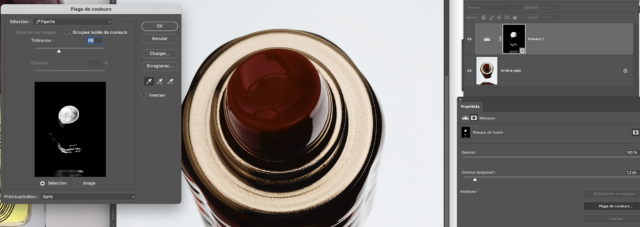
    In Photoshop

    I have an image

    1/ I create a levels layer over it

    2/ select mask levels part and add some progessive contour

    3/ SELECT by color range the part I need with the pipette


    and then I have a levels with a mask to modify just a little part of the image !!!

    do any one know how to get the same process ? with after effect effect with native plug in

    or maybe with aescripts plugin ??


    Let me know 🙂 it could help me a lot !!!!!

    Thanks a lot

    Ben


    Andy Kiernan replied 2 years, 2 months ago 2 Members · 1 Reply
  • 1 Reply
  • Andy Kiernan

    February 18, 2024 at 11:40 am

    A simple way might be to use the luminetri colour effect, there is a menu within it, where you can select by colour and it will create matte, you can then select show matte (making a the image greyscale) and use that to matte out an adjustment layer with levels effect on to effect the original footage at the bottom of the stack.

    Or you can add a ‘hand drawn’ mask to the layer add a levels effect then in the effect properties (on the layer) use the compositing options and add the mask to it.

    Or, use key light to key out the colour you want to keep, this will get rid of it, but then use an invert.

    Or, there’s an effect called leave colour or something, it’s in the colour corrections part of the effects menu.

    Hopefully one of these will get you some of the way.

We use anonymous cookies to give you the best experience we can.
Our Privacy policy | GDPR Policy