

Activity › Forums › Adobe After Effects › Get a camera position from a image?
-
Get a camera position from a image?
Posted by Konstantin Smirnov on September 18, 2020 at 9:43 pmCan you get a camera position from the perspective of a still image in After Effects? I know you can track the camera motion in video clips , but it doesn’t work for images or footage shot on a tripod (where there are no camera movements).
I know that one could use the corner pin effect and pin whatever you like on a wall for instance according to the perspective. That is not what I’m after here. I want to get a camera position or a 3D plane from the perspective of the still image/video. Do anyone know how to achieve that?
Thanks
Michael Szalapski replied 5 years, 11 months ago 5 Members · 13 Replies -
13 Replies
-

Michael Szalapski
September 19, 2020 at 1:35 amAfter Effects doesn’t really have a way to do that. I know how to do it in Cinema 4D, if you have it.
Now, you can kind of do things with Vanishing Point in Photoshop (which you might be able to bring into AE) that might work for you, but it’s all dependent on what, exactly, are you trying to do with this camera position information.
-

Brendon Murphy
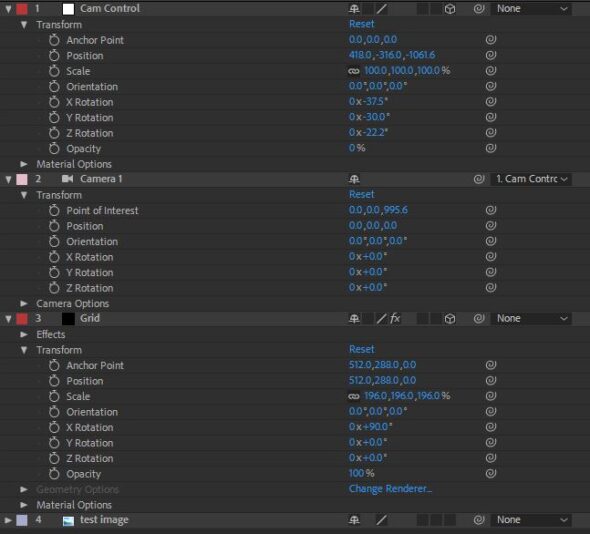
September 19, 2020 at 1:55 amThe classic method is to use some 3D solids with a grid effect on them. Depending on your image, it generally helps to set them up as a ground and two side walls. Then move the camera, not the solids, to line up your scene.
You will need to set the sensor size and focal length of your AE camera to match the real-life camera. Hopefully you have this info. If not, you’ll need to test several focal lengths until one fits your grids. If your image is a camera still, there may also be exif metadata embedded with some of the needed details. Some tracking apps, like pftrack, also have a focal length estimator.
I’ve also seen people use a software called fspy in conjunction with blender to assist with aligning a camera to an image. May be worth a quick look: https://fspy.io/
-

Stephen Smith
September 19, 2020 at 3:12 pmAre you asking to do a 3D move on video that is static? That can be done. But I’m not sure if you are asking to do something else.
-

Konstantin Smirnov
September 19, 2020 at 3:31 pmThanks for the reply. I dont have either C4D or Photoshop. The purpose of getting a camera position from a perspective from image or static shot is so that I could make a 3D plane with an animated texture or put some models on to it.
-
Konstantin Smirnov
September 19, 2020 at 3:35 pmThanks for the reply man. I tried your suggestion but its really hard and time-consuming. I was looking for a more sleek and faster way of achieving the same effect.
I will check out the software for blender that you recommended. Thanks
-
Konstantin Smirnov
September 19, 2020 at 3:38 pmI want to get the camera position so that I could make a 3D plane viewed in the same position as the image/static video was shot in.
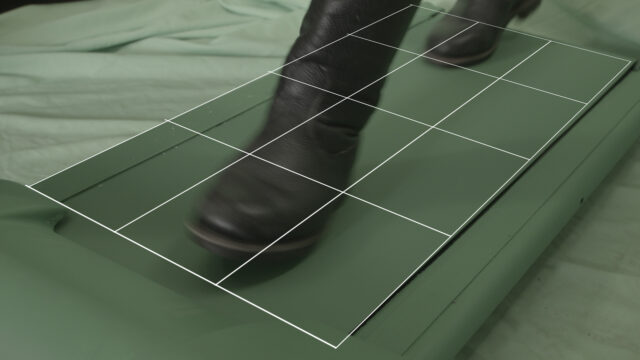
For example, I would like to make a 3D plane underneath the feet in this shot. Ignore the grid since its the corner pin effect and is not in a 3D space.

-
Brendon Murphy
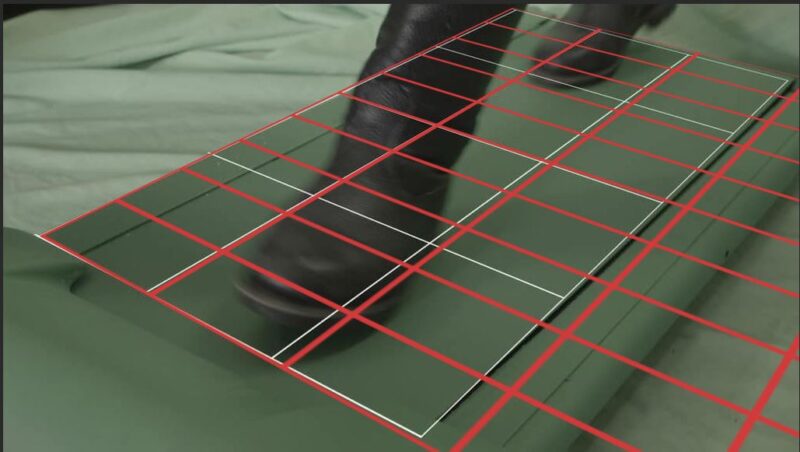
September 19, 2020 at 5:13 pmThis is what I got with a quick manual lineup. 40mm lens when using a 35mm sensor.
-
Michael Szalapski
September 21, 2020 at 2:32 pmI still don’t understand why corner pin wouldn’t work for you.
You could super-easily make an animated texture underneath his feet with it.
-

Hope Holmesby
September 22, 2020 at 1:53 am“I still don’t understand why corner pin wouldn’t work for you.
You could super-easily make an animated texture underneath his feet with it.”
Michael, if he used the corner pin and added an animated texture then he would have to just mask out the still image of the feet, right?
-
Konstantin Smirnov
September 22, 2020 at 9:35 amI want the a 3D plane so I could build 3D models on the ground
Reply to this Discussion! Login or Sign Up