Creative Communities of the World Forums

The peer to peer support community for media production professionals.

Activity Forums VEGAS Pro FX Effect on Text

  • FX Effect on Text

    Posted by Bob Hobart on April 13, 2026 at 10:36 am

    Hi, I’ve inadvertantly added some sort of FX effect on ALL my titles and text in a hour-long holiday video. I was only toying around with one text clip and thought I had cancelled it but now find all my texts are effected – see attached sample pic. I haven’t rendered yet so hopefully someone can help me so I can reverse this effect. I have tried to load a new text box thru Media Generator but the same effect is loading automatically – see 2nd attached pic. I’m using Vegas Pro 21.

    Brie Clayton replied 3 months, 1 week ago 3 Members · 3 Replies
  • 3 Replies
  • Derek Moran

    April 14, 2026 at 8:38 am

    Hi Bob

    Sounds like you have accidently added “Glint” to the Video Track FX.
    If you haven’t turned on FX for the track yet, you will have to do that step first!
    I’m guessing this is what is causing the confusion.

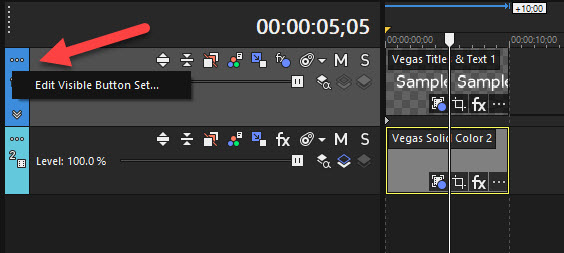
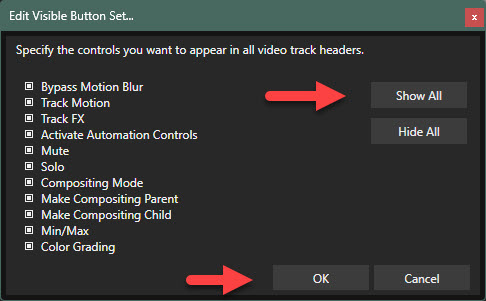
    1. Press “three dots” in top left corner of track control box, for your Text Track, and select Edit Visible Button Set.
    2. To keep things simple, Select All and OK.
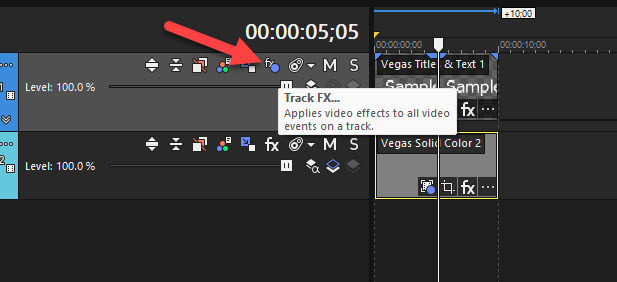
    3. Now press FX button (in track control box) and delete “Glint FX” from FX chain.

  • Bob Hobart

    April 14, 2026 at 9:34 am

    Thank you very much Derek – your instructions worked! I’ve never used FX Effects so I had no idea where to find the controls. Many thanks indeed.

    Cheers

  • Brie Clayton

    April 14, 2026 at 11:05 am

    Thanks for solving this issue, Derek!

We use anonymous cookies to give you the best experience we can.
Our Privacy policy | GDPR Policy