-
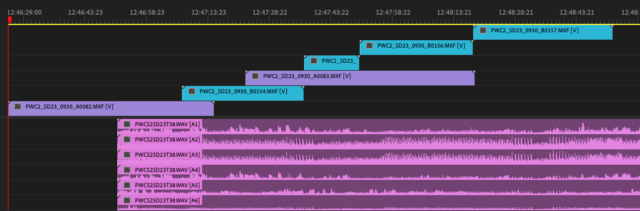
Flatten vertical gaps in a multicam sequence without using Simplify Sequence?
I have long audio files that have many camera files associated with
them, and when I make them into a multicam sequence, the timeline ends
up with each camera clip on a new track, ascending.I want to clean it up so all the clips are on 2 tracks (V1 for A cam, V2 for B Cam, for example).
But if I use Simplify Sequence to close the vertical gaps I lose the fact that it’s a multi-cam sequence, or it messes up my audio tracks and mushes all my 6+ channels onto one mono track.
I know I can use ALT + Arrow keys to move tracks up and down, but I have dozens of clips within each single multicam sequence, and then dozens of other multicam sequences from full-day shoots.
Any way to make or clean up the sequence so the files stay on 2 video tracks without spending hours holding the ALT key or losing the multi-cam sequence?