

Activity › Forums › Apple Final Cut Pro Legacy › Final Cut Pro 7 wishlist
-

Paul Dickin
November 14, 2008 at 2:28 pm[Martin Baker] “Paul, are you saying that this is what Adobe have under the hood of CS4 today? “
Hi
I’m no expert, and maybe my addition of 2 + 2 = 5 (4 + a whole load of hype), but in part that’s sort of the way it was explained to me by the Adobe guys at The Production Show when Premiere Pro CS3 for the Mac was first announced.A much clearer explanation was given by someone here in a very long ‘advantages/disadvantages-of-Premiere Pro’ thread in the Discrete Edit*ors forum a year or so back, but I can’t link to it as that forum has gone poof, an ex-forum….
-

David Roth weiss
November 14, 2008 at 5:00 pm[Martin Baker] “are you saying that this is what Adobe have under the hood of CS4 today?”
Paul isn’t saying it Martin, but I am. It’s Adobe’s Dynamic Linking. It definitely paves the way toward the future.
[Martin Baker] “So it makes perfect sense to put a common timeline at the heart of the apps and have modules that can access that timeline and make changes to it. Essentially you end up bringing the tools to the timeline rather than the other way round, and that opens up some very interesting possibilities…plus some big challenges of how you keep track of everything.”
Adobe has figured out a way to use XML to keep track of things in an almost magical way. Metadata and links between files are retained even after uninstalling and reinstalling the entire the software suite. I discovered ths by accident and found it to be rather amazing.
David Roth Weiss
Director/Editor
David Weiss Productions, Inc.
Los AngelesPOST-PRODUCTION WITHOUT THE USUAL INSANITY ™
A forum host of Creative COW’s Apple Final Cut Pro, Business & Marketing, and Indie Film & Documentary forums.
-
Paul Dickin
November 14, 2008 at 6:01 pm[David Roth Weiss] “Adobe has figured out a way to use XML to keep track of things in an almost magical way.”
Hi
XML data structures seem to me to be sort of a ‘linear’ system, and that’s fine for the metadata in a linear entity, like a movie file.
It should be embeded in the media assets, fully transportable.But what an NLE suite’s Project File structure should be is non-linear – obviously!! 😉
A robust non-linear random access database structure.So far only Avid (and before that Fast) seem to have tried to nail that down – not sure whether the penny’s dropped with Adobe and Apple.
Anyway the more of this that gets deep-down integrated into Snow Leopard’s Core services – Core Dynamic Link – the better 🙂
-
David Roth weiss
November 14, 2008 at 6:18 pm[Paul Dickin] “XML data structures seem to me to be sort of a ‘linear’ system, and that’s fine for the metadata in a linear entity, like a movie file.
It should be embeded in the media assets, fully transportable.But what an NLE suite’s Project File structure should be is non-linear – obviously!! 😉
A robust non-linear random access database structure.”Paul,
Believe me, I am no expert on this stuff, nor do I play one on TV, but it occurs to me that we have reached levels at which processing power and massive RAM can easily handle the linearity of metadata, such as XML, because it’s comprised of a miniscule amount of data that can remain loaded in memory at all times. Isn’t that one of beauties of 64-bit and multi-threading?
David Roth Weiss
Director/Editor
David Weiss Productions, Inc.
Los AngelesPOST-PRODUCTION WITHOUT THE USUAL INSANITY ™
A forum host of Creative COW’s Apple Final Cut Pro, Business & Marketing, and Indie Film & Documentary forums.
-
Paul Dickin
November 14, 2008 at 6:38 pm[David Roth Weiss] “processing power and massive RAM can easily handle…”
Hi
Needs a project data ‘checksum’ in there somewhere as well I feel…
Otherwise we’ll forever be trashing preferences, or fishing out autosaved projects 🙁 -

Tapio Haaja
November 21, 2008 at 11:23 amI also like to see better support for Audio unit plug-ins. I don’t want FCP to be audio editing suite but 99% of time I simply need to add compressor/limiter (Waves Ultramazimixer) to final mixdown and I hate that I have to go to Soundtrack Pro for such a small thing.
-

Hector Berrebi
December 2, 2008 at 9:21 am*this was meant for the end of this thread… sorry
strange… no more wishes?
i thought these things worked 🙂
this list was assembled by me and a few other FCP trainers in our last TTT training a while back (almost a year ago) it was sent to apple… a few things have been mentioned before but heck…
DON’T STOP WISHING 🙂
practical wishing
1. modify timecode. in the Modify menu there is an option to change TC or switch to AUX TC, when you de-select the check mark FCP will eliminate the master TC, if you re-check the mark, the master TC is zeroed, it also cancels TC in the original media files. i think that on such an important function there should be an extra warning question.
2. Add “Reel name” to sequences export – if one clip is exported it will take it’s reel name, if not FCP should ask you for a reel name.
3. dissolve. dissolves and other transitions can be placed ending, starting or centered on cut yet in many cases comes up a need for a-symeric transition (starting 5 frames before ending 20 after the cut) i hate saying this, but the way Avid does custom positioning for transitions is very useful.
4. changing speed on the timeline. speed changes on the timeline are tied to a ripple action that in most cases is not desired, either pushing or pulling the rest of the sequence according to the new duration of the modified clip. even if i work on an higher empty track.
it would be nice to have the option to choose between rippling and overwriting/shortening.5. go to next edit. only stops at first frame of cuts… opt + go-to-next-edit could stop at last frame of clips on the timeline. extremely useful in reconforming FX shots, and stop-motion animation.
6. keyframes. can’t be copied and pasted, multiple selected, moved in groups*, are not dynamic when trimming, collide unpleasantly with transitions and generally tend to be very archaic. it does not have to be Motion keyframes, but it could be so much better.
7. color labeling. more freedom in coloring markers and clips on the timeline (without it affecting my master clips) and more colors.
8. image sequence. FCP should regard and open image sequences like motion
9. When sending to Motion Add the option to place the embedded motion above the original clips instead of replacing.
creative wishing
1. fast lane. it would be great to have the possibility to have a stripe on the timeline window somewhere that when hovered above gives (HUD style) the option to accelerate (from 0 to 100 in 3 seconds?) left or right on the timeline. it would help efficient mobility when zoomed in all the way and working on very short edits. or maybe a soundtrack like view
2. interface brightness. a slider to adjust the background brightness of the browser, timeline and even buttons from the current medium gray to dark grays. a second slider could adjust the brightness of button content from black to white.
3. Viever HUD. a full HUD containing the browser, effects, filters, controls and basic motion (somewhat like the aperture HUD) to the shot i am currently on in the timeline.
4. adjustment track. the possibility to make adjustments and changes to a track (or slug) that will influence all cuts underneath.
5. group/ungroup. the possibility to create groups from timeline clips, then move and apply changes to the group or to individual clips within it.
6. linking audio and video. the possibility to link more than one video clip to the 24 potential audio clips.
7. (pretty please with sugar on top…) full RGB workflow 🙂 ? please?
this thread should not die out… not when Christmas is so close (our christmas, april 20th)
Hector Berrebi
Schibber Group
prePost Consulting -
Tom Wolsky
December 2, 2008 at 11:59 am3. I’ve never understood this. What’s an asymmetrical cross dissolve? By shifting the amount used, aren’t you just shifting the In point. I can see it for a fade in/fade out, which you can make asymmetrical in FCP, but not for a dissolve. Maybe I’m not getting what it’s supposed to look like.
Surprised the list doesn’t include the ever popular automatic scrolling timeline.
All the best,
Tom
Class on Demand DVDs “Complete Training for FCP6,” “Basic Training for FCS2” and “Final Cut Express Made Easy”
Author: “Final Cut Pro 5 Editing Essentials” and “Final Cut Express 4 Editing Workshop” -
Hector Berrebi
December 2, 2008 at 5:43 pmhi Tom
though i haven’t tested it lately. i always hated scrolling timeline in avid… so much i didn’t notice its absence in FCP. i seam to remember it (years back) as a buggy feature, especially on complex timelines. i should take a look at it in MC3 on mac and see if it runs smother now…
asymmetrical cross dissolves are awesome. imagine a a cut where shot A is an old man finishing a sentimental confession and gazing away in reminiscence and Shot B is a landscape, a sunset for example. and you have a dissolve between them where at the end of shot a A you have about 7-10 blended frames of dissolve (maybe matching a musical note) but in the beginning of shot B you have 28-36 blended frames, the old man’s gaze slowly fading away over the sunset. it looks and feels nothing like centered on cut.
you could work around this and get the same result. but as AVID has this dissolve option for many many years now (at least since 97), how complex can it be to implement…?
peace.
Hector Berrebi
Schibber Group
prePost Consulting -
Hector Berrebi
December 2, 2008 at 6:17 pmTom..
maybe this will make it clearer than explaining..
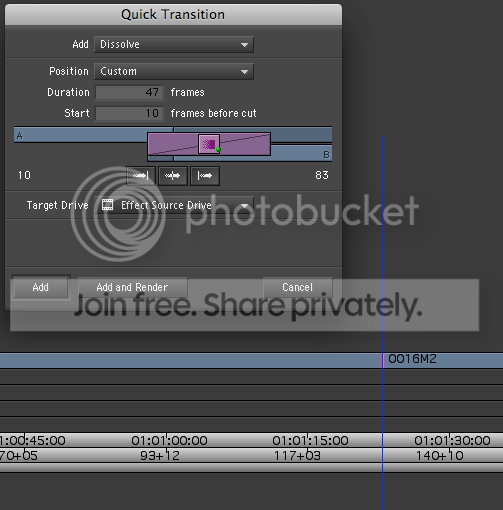
some time one side does not have enough media and you still want a long dissolve..
Hector Berrebi
Schibber Group
prePost Consulting
Reply to this Discussion! Login or Sign Up