

Activity › Forums › Apple Final Cut Pro Legacy › FCP–>Shake
-
FCP–>Shake
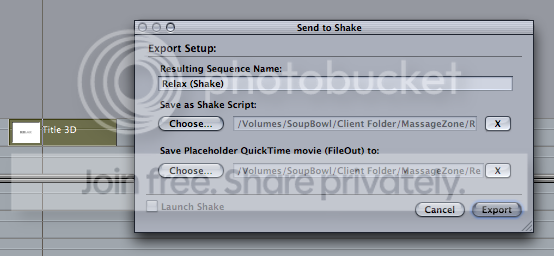
Posted by Teerav on May 4, 2007 at 9:00 pmanyone have an idea as to why when i try to export a clip from the FCP timeline to shake. it doesnt give me the option to launch shake? Nor if i go in and manual load the script, the project is empty?
 Bbalser replied 19 years, 4 months ago 2 Members · 8 Replies
 -
8 Replies
-

Bbalser
May 5, 2007 at 11:41 amI can’t figure out why your Launch Shake box is grayed out. I can send video clips, text clips, anything created with a generator in FCP, LiveType project files, Whole Sequences from the Browser, etc.
Are you trying to export a clip from the Timeline, if so, what type of clip is it, how was it generated in the first place?
-

Teerav
May 5, 2007 at 6:16 pmyes, i tried exporting a clip from the timeline but it still does the same thing. the clip is dvcpro50 30p, captured from my p2 store, and im using shake 4 and FCP 5.0.4 its driving me insane cause it works fine with my g5 at home. Do i have to set the path for shake somewhere in FCP?
-
Bbalser
May 5, 2007 at 6:38 pmIt should just find Shake, I’m not aware of having to teach FCP where Shake is. Seems odd. What version of FCP is running on your G5?
– Apple Certified Trainer
– Tutorials at http://www.bbalser.com
– South Louisiana FCP Users Group
– NOVAC Digital Filmmakers Institute
– Event DV magazine -
Bbalser
May 5, 2007 at 8:04 pmAs long as Shake is registered. Very odd, and I can’t seem to duplicate it, but I’m on 5.1.4. Very odd…
– Apple Certified Trainer
– Tutorials at http://www.bbalser.com
– South Louisiana FCP Users Group
– NOVAC Digital Filmmakers Institute
– Event DV magazine -
Teerav
May 5, 2007 at 11:17 pmyes, its definitely registered, and the reinstall did not fix it. its very odd cause like i said, i have more or less the same setup at home and it works fine. i tried exporting a clip from a completely different project, but still the same…. sigh
-
Bbalser
May 6, 2007 at 12:50 amOnly thing I can think of at this point is trying to save it to a different location, perhaps a different drive. Wierd, should work.
– Apple Certified Trainer
– Tutorials at http://www.bbalser.com
– South Louisiana FCP Users Group
– NOVAC Digital Filmmakers Institute
– Event DV magazine
Reply to this Discussion! Login or Sign Up