Creative Communities of the World Forums

The peer to peer support community for media production professionals.

Activity Forums Adobe After Effects Eyedropper Idiocy. Help!

  • Eyedropper Idiocy. Help!

    Posted by Ryan Dunn on December 4, 2020 at 3:01 pm

    Apologies if this was posted already, but maybe some of my fellow AE braniacs can help me out with this idiotic feature/bug.

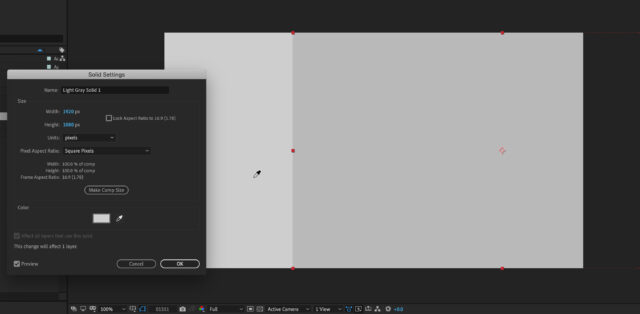
    I select a solid, open its settings, and try to sample a color in my comp. As you can see in the screenshot, the color it picks up is nowhere close to what is actually under the eyedropper.

    Any help would be greatly appreciated, and shame on After Effects for ever letting something like this happen!

    …ryan

    Michael Szalapski replied 5 years, 8 months ago 3 Members · 3 Replies
  • 3 Replies
  • Michael Szalapski

    December 4, 2020 at 4:34 pm

    That seems weird. Are there any adjustment layers in your comp that could be affecting things?

    If not, what color management settings are you using?

  • Walter Soyka

    December 4, 2020 at 5:40 pm

    The sampled color in the Solid Settings dialog matches the color under the eyedropper (#CECECE).

    Perhaps the solid layer on the right that you’re giving that color doesn’t have its opacity up to 100? Or there’s some other effect applied to it?

  • Michael Szalapski

    December 4, 2020 at 6:51 pm

    Yeah, that’s a clearer way of saying what I was saying. ?

We use anonymous cookies to give you the best experience we can.
Our Privacy policy | GDPR Policy