

Activity › Forums › Adobe After Effects Expressions › Expression to Control a Single Keyframe’s value
-
Expression to Control a Single Keyframe’s value
Dan Ebberts replied 3 years, 10 months ago 6 Members · 12 Replies
-

Anita Gwara
August 8, 2022 at 1:58 pmHello! I understand this was ages ago but I am hopeless 😅
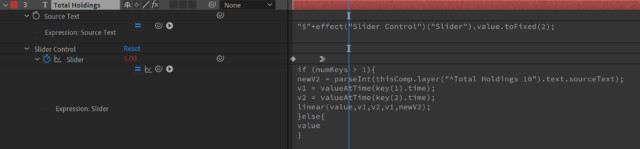
I just used this expression and it worked perfectly for what I needed: I have a text layer that pulls data from a spreadsheet and a second text layer that has this number animated counting up (used the expression on this layer on a slider control).
The only issue is that the number pulled from the spreadsheet has decimal numbers, like 5.15 and the counter somehow rounds it up and I end up with 5.00. So I do have decimal numbers added (see on the screenshot) on the counter expression but for some reason, it rounds to 0 😓

-

Dan Ebberts
August 8, 2022 at 2:08 pmInstead of this:
newV2 = parseInt (thisComp.layer("Text Layer").text.sourceText,10);try this:
newV2 = parseFloat (thisComp.layer("Text Layer").text.sourceText);
Reply to this Discussion! Login or Sign Up