Creative Communities of the World Forums

The peer to peer support community for media production professionals.

Activity Forums Adobe Premiere Pro Exporting to XML from PP – What am I doing wrong ???

  • Exporting to XML from PP – What am I doing wrong ???

    Posted by Karen Yarosky on September 13, 2022 at 12:10 pm

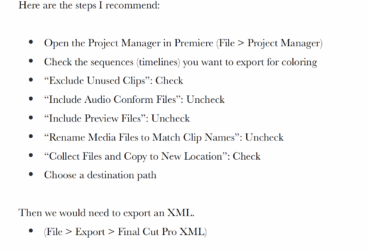
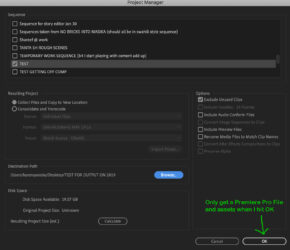
    I am trying to get a 1 hour film exported to XML for my Colourist. I was given directions (attached) to first open project manager, choose settings and THEN go File > Export > Final Cut Pro XML. This does not work. In Project Manager if I hit “OK” after selections I get a Premiere Pro file (and assets). If I just go File > Export > Final Cut Pro XML I am getting a tiny file and no assets whatsoever attached. I have tried (as a test) removing ALL audio, and leaving just 1 line of video with NO effects and exporting to Final Cut Pro XML … still no luck. I end up with a tiny file (like 80 kb!) for a 2 minute sequence. Am I missing something obvious? Does anyone have any better directions to help me out? Many Thanks ….
    Jon Hensen replied 3 years, 7 months ago 3 Members · 2 Replies
  • 2 Replies
  • Doug Metz

    September 13, 2022 at 2:50 pm

    At the Project Manager stage, you should hit that OK button to package the project.

    Then you open the resulting project file to export the XML.

  • Jon Hensen

    September 19, 2022 at 6:17 pm

    It is worth noting that unless you are editing in full resolution off of your native camera essence (sometimes referred to as raw media – not to be confused with RAW codec), your colorist will also want access to the original raw camera files. Are you editing off of transcodes or working via the Premiere proxy workflow?

    The colorist will likely need the first generations (raw camera files) to perform the color grade and then either send you back a fully rendered and graded timeline or individual graded clips. The latter will likely need to occur for any areas of the edit that contain effects or transitions native to premiere.

We use anonymous cookies to give you the best experience we can.
Our Privacy policy | GDPR Policy