

Activity › Forums › Apple Final Cut Pro › Exporting 8 Channel Stereo Audio for Broadcaster
-
Exporting 8 Channel Stereo Audio for Broadcaster
Posted by Paul Neary on December 13, 2025 at 10:18 pmHi all,
Client asked for 8 Channel Stereo Export –Stereo Master
Channel 1&2 – L/R
Channels 3-6 – N/A
Channel 7&8 – Descriptive Video (L/R)When I first exported the DV role it activates in VLC when selected but it is ‘Track 2’ and that was rejected by the client.
When I tried again to make the main audio on channel 1 AND 2, and the DV on 7 AND 8 by adding blank audio roles blank during export (3 – 6) the VLC player still doesn’t display channels 7 or 8 (just 3 and 4).
When I tried to export through Compressor there was no option to select what goes in which channel when I selected ‘8 Channel’ Audio, so everything played at once after export.
Is there something I’m just totally overlooking on this?
FCPX 11.2
Mads Nybo jørgensen replied 6 months, 3 weeks ago 3 Members · 7 Replies -
7 Replies
-

Mads Nybo jørgensen
December 14, 2025 at 12:26 amHey Paul,
FCP is the worst for managing a track output as it is built for using [random] magnetic magic tracks.
Setting that aside, is it correct to understand from your post that you are exporting to a DV codec?
If so, this is not what you would normally consider a Broadcast standard codec.
Most broadcasters will have delivery standards either on their webpage and/or for the production to be given before delivery.
Instead of DV, they normally have ProRes HQ or a higher format.
There are other codecs such as AS-11 DPP file or DCP.
But as you are on FCP, you are likely to be “forced” to use ProRes.To get the audio onto the right tracks, you are likely to have to use “Roles”. There is at Apple a basic explainer here:
https://support.apple.com/en-gb/guide/final-cut-pro/verb71cb7e5/macVLC is great for many things, except for checking your video file “export” structure.
Best to re-import file back in to FCP to check if the audio are in the right tracks.
Or better, import file in to an NLE where you can easily see the tracks in your timeline.
Hope this helps?
Atb
Mads
support.apple.com
Export roles in Final Cut Pro for Mac
In Final Cut Pro for Mac, export roles as separate files.
-

Ben Balser
December 16, 2025 at 4:17 pmBroadcasters are asking for MPEG3 and MP4 and H264 video formats for broadcast. I’ve yet to find anyone in broadcast who considers ProRes a broadcast format. Of the stations I’ve worked with and for over the years, none would know what to do with a ProRes file and reject it. Personally, I”d do this in Resolve. Until Apple includes a proper, professional Audio Mixer with buses and realistic output control, I’ll never fully accept it as a professional level NLE. It’s too isolated and dumbed down.
Anyway, get the specs sheet from the specific broadcaster. All TV stations have one. Deliver strictly according to it.
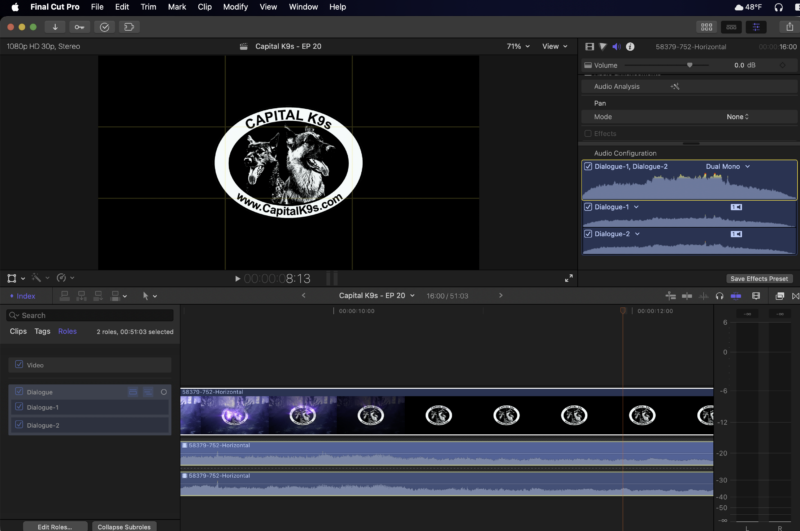
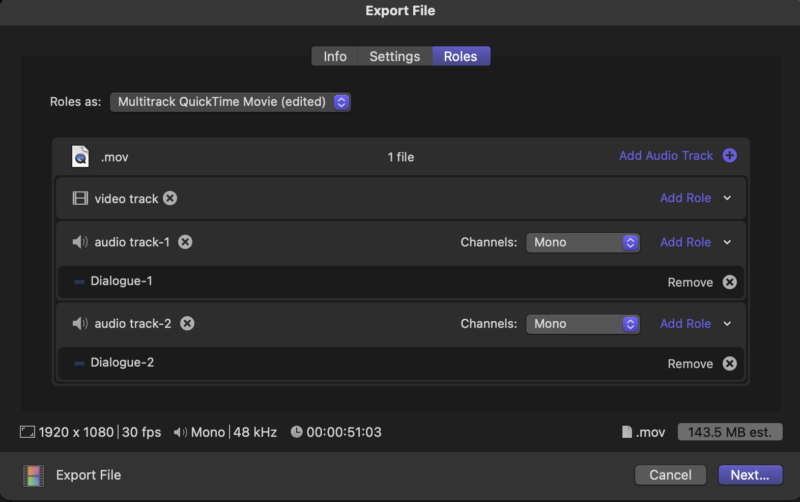
As for splitting up all your audio, you’ll be using Roles as explained. Then on output, you can control what gets included and what doesn’t. FCP is actually (as stated) the worst NLE for doing audio work inside of. But basically, you’ll assign Roles for each audio channel needed for output. Then in the Inspector, configure your channels for each clip as needed. Then in the export window, configure the Roles as you need.

-
Mads Nybo jørgensen
December 16, 2025 at 5:06 pmHey Ben,
“Broadcasters are asking for MPEG3 and MP4 and H264 video formats for broadcast.”
Are you sure?
That all depedns on the market that you are working in, and destination.
Maybe AMWA AS-11 (based on MXF) would be a better much format for delivery, but if I reember correctly that would require Compressor.
And, MPeg3 has a long time ago got retired, as it was “merged” into the MPEG-2 codec.
Point is, depending on the broadcaster and what market they are covering, and depending on the kit you use, you are more likely to get clean pass with ProRes out of FCP, than with MP4 or H264.
Just an opinion.
Atb
Mads -

Paul Neary
December 19, 2025 at 10:24 pmHi Mads,
It wasn’t a DV export, but I did figure it out thank you, and it was painfully simple.I just created a nothing role ‘NULL’ with a silenced 2 second audio in the timeline (as someone else mentioned I could just have channel assigned to a role that had nothing in it, but I wanted to be able to track if there was any feedback by labelling each ‘Null’ accordingly). So it ended up like this:
Channel 1 – stereo – dialogue (becomes Channel 1&2)
Channel 2 – stereo – null (empy/silence) (becomes Channel 3&4)
Channel 3 – stereo – null (empty/silence)(becomes Channel 5&6)
Channel 4 – stereo – Descriptive Video File (DV Role) (becomes Channel 7&8)Again, basic and simple but just one of those learning things I guess.
Thanks again and if hopefully this helps someone else down the road.
-
Mads Nybo jørgensen
December 20, 2025 at 3:46 amHey Paul,
Great to hear that you got it sorted.
If only there was less “painfully simple” solutions, and more straightforwardness when delivering masters.
Blockchain and digital keys making their way into delivery systems to authenticate the author.
Just wait till you have to deal with KDMs and DKDMs – I only learned the process of this recently.
But it does help keep our content safe.Atb
Mads -
Ben Balser
December 22, 2025 at 3:05 pmMads, I work broadcast, have for over two decades, think I know what I’m talking about. MXF was popular at one time, not so much any more. And no, broadcast is not regional with codecs like you state. It’s pretty standardized across the board now.
-
Mads Nybo jørgensen
February 27, 2026 at 12:51 pmHey All,
In case anyone do a search, I am just adding one comment to this conversation, which is:
When delivering a MASTER (Digital, or otherwise) always ask your client what their specifications are.For the bigger broadcasters, and streamers, they often have their specifications listed on their website, easy to find if you search for it.
IMPORTANT: All of the below will be subject to change as new file formats, delivery and display systems are introduced.
Headliner explanation courtesy Dolby Professional support:
https://professionalsupport.dolby.com/s/article/Overview-of-Dolby-Atmos-Master-File-FormatsIMF IAB (.mxf)
IMF IAB is an MXF file that carries audio and metadata in an Immersive Audio Bitstream (IAB), which has been standardized by SMPTE. The advantage of IMF IAB files is that they fit into IMF file containers, enabling the packaging of picture, subtitles, channel-based audio, and Dolby Atmos audio in a single IMF. This can be very useful for delivery, quality control, and archiving for large OTT streaming services.
A few examples:
Netflix (Again Headliner, as it is much more involved than just the media “container” used for delivery):2. IMF Specifications 2.1 Packaging
All deliveries to Netflix must be compliant to either SMPTE ST 2067-21:2016, SMPTE ST
2067-21:2020 or SMPTE ST 2067-21:2023 Interoperable Master Format (IMF) Application #2E. Packages containing immersive sound must additionally comply with SMPTE ST 2067-201:2019 Immersive Audio Bitstream (IAB) Level 0 Plug-in.Netflix IMF Packages should be created directly from the color timeline out of a capable color grading tool OR from an intermediate mezzanine asset. IMF Packages must be delivered in the highest quality and resolution, including High Definition (HD) and Ultra High Definition (UHD). Netflix may explicitly request other resolutions.
BBC Studios pdf: 51 page guide for delivery:
https://www.bbcstudios.com/media/6914/contentdeliverybook.pdfPage 20:
6.2 HD File Specifications
Video Source Digital: HD-SDI
Video Codec Profile Apple ProRes® 4:2:2 (HQ)
Container MOV (All files must have .mov extensionPage 22:
6.5 UHD File Specifications:
Video and Video
Codec
Format Standard ITU-R BT.2100 (3840 x 2160 25P)
Profile HDR Format Hybrid Log-Gamma
Reference White* 75 IRE (code value 721)
Colorimetry ITU-R BT.2100 (as defined in ITU-R BT.2020)
Colour Space 4:2:2 YCRCB
—-
Structure Intra Frame (I-Frame) only
Container MOV – QuickTime
Format Apple ProRes 422 (HQ)
Bit Rate 700 Mb/s
Encoding Profile HighPage 27:
6.12 IMF
BBC Studios will only accept IMF packages for specific titles and with pre-agreement.
If you would prefer to deliver an IMF package, please get in touch with your
programme operations contact to discuss the possibility further. An IMF package may
be requested of production by exception when key co-producers and / or
commissioning partners have a requirement.BBC – Different to BBC Studios!!!
https://www.dropbox.com/s/sjsjlf4qtm68xc3/TechnicalDeliveryStandardsBBCFile.pdf?dl=0
Technical delivery standards
The BBC requires all Network television programmes to be delivered as AS-11 DPP files.
More information on AS-11:
https://www.thedpp.com/specs/as-11
AS-11 UK DPP
Developed in conjunction with UK broadcasters, the AS-11 UK DPP file delivery specification provides a format for completed programme deliveries (‘air-ready masters’). It is based on the MXF OP1A format with AVC Intra Class 100 compression for HD, and IMX at 50 Mb/s for SD. It includes a minimum set of requirements for Programme Editorial and Technical Metadata, based on EBU Core. Most UK broadcasters’ programme delivery requirements are based on AMWA AS-11 UK DPP.
Amazon Studios:
https://portal.amazonstudios.com/hc/en-us/articles/15986851525147-Delivery-QC
Digital Cinema Packages (DCP)
A Digital Cinema Package (DCP) is utilized for Theatrical distribution and exhibition. A DCP is a collection of audio, image, and data files. AMS Post Executive will advise when a DCP is required and provide the format specifications.
(<strong jscontroller=”zYmgkd” jsuid=”JhCmAd_1g” data-processed=”true”>Key DCP Standards & Formats:
<ul jscontroller=”mPWODf” jsuid=”JhCmAd_27″ data-processed=”true”>
- <strong jscontroller=”zYmgkd” jsuid=”JhCmAd_2a” data-processed=”true”>SMPTE DCP: The current, modern standard for digital cinema, supporting higher frame rates and more features.
- <strong jscontroller=”zYmgkd” jsuid=”JhCmAd_2d” data-processed=”true”>Interop (Inter-Operating) DCP: An older, deprecated “de facto” standard that was used as a stopgap before the formal SMPTE standard was fully adopted.
- <strong jscontroller=”zYmgkd” jsuid=”JhCmAd_2g” data-processed=”true”>JPEG 2000: The required video compression codec.
- <strong jscontroller=”zYmgkd” jsuid=”JhCmAd_2j” data-processed=”true”>MXF: The wrapper format used for audio and video.)
In addition, Amazon has a whole page with nearly every possible delivery scenario:
<b title=”Asset Technical Specifications” data-title=”Asset Technical Specifications”>Asset Technical Specifications (Post-Production):
https://portal.amazonstudios.com/hc/en-us/articles/15986845319323-Asset-Technical-SpecificationsMXF appears 46 times on that page.
.mov appears 25 times.
Disney ABC Television Network deliverables: [Feels a bit outdated, so there may be a newer version]:
https://files.disneyadvertising.com/MediaKit/ABC-Brands/HD-Tech-Specs.pdf
As of April 28, 2022:
The file delivery format for delivery to ABC is MXF for playout on ABC’s Nexio server farm. Details about the file format are specified in section 2.5.7.
2.5.7 Encoding
2.5.7.1 All MXF files should be encoded XDCAM-HD at
a data rate of 50Mbps
2.5.7.2 All audio should be recorded uncompressed,
at a sampling rate of 48KHz and at a
preferred bit depth of 20 bitsPBS 86 page pdf “Producer’s Handbook”
https://www.pbs.org/about/producing-pbs/bento-api/filer-file-download/392931/
DIGITAL FILE DELIVERY SPECIFICATIONS
ProRes HQ
File Format: Quicktime (.mov)
Size Estimate: ~ 1GB per minute of video
Timecode starts at 1:00:00;00
No closed captioning.
One (1) video per file.
Video Stream
Codec: ProRes HQ
Frame Size 16/9: 1920 x 1080
Frame Rate: 29.97 Drop frame
Video Standard: NTSC
Scan Type: Interlaced (Upper Field First)
Video Stream BitRate: 220 Mbps
Video Stream BitRate Mode: CBR
Audio Stream
Codec: PCM (Little Endian)
Audio Stream BitRate: 1.4 Mbps
Audio Stream BitRate Mode: CBR
Number of Audio Channels: 4 (Stereo 1&2, Mono 3&4)
Sampling Rate: 48 KHz
Bit Depth: 16 bitsPBS Distribution: GLOBAL TECHNICAL SPECIFICATIONS
3.1 Accepted Video Codecs
High Definition (HD): Preferred – Apple ProRes 422 HQ
Acceptable – DNxHD MXF OP1a 175 10bit or higher resolution (mxf wrapper)
Ultra High Definition (UHD): Preferred – Apple ProRes 422 HQ or Apple ProRes 4444 (mov wrapper)
Acceptable – DnxHR HQ UHD or 4K UHD IMF extension 2 (mxf wrapper)
When delivering UHD content, a matching HD file must also be delivered in compliance with the above HD codecs.End note:
This is just a small selection of streamers and broadcasters.
Please, please, please keep in mind, that if you do not follow their specifications, your program delivery are likely to be rejected by their Quality Control process. This in itself is expensive.
And much more expensive if you miss your deadline.There is a reason for why some of these documents runs past 50 pages in volume.
And I have only covered a fraction oin this post, which is mainly related to what video codec/wrapper you should look out for when delivering.Happy to help here, or away from the public.
Hope this helps?
Atb
Mads
Reply to this Discussion! Login or Sign Up