Creative Communities of the World Forums

The peer to peer support community for media production professionals.

Activity Forums Adobe Premiere Pro Essential Graphics: Text being cut off when I scale up.

  • Essential Graphics: Text being cut off when I scale up.

    Posted by Austin Steele on October 9, 2024 at 1:22 pm

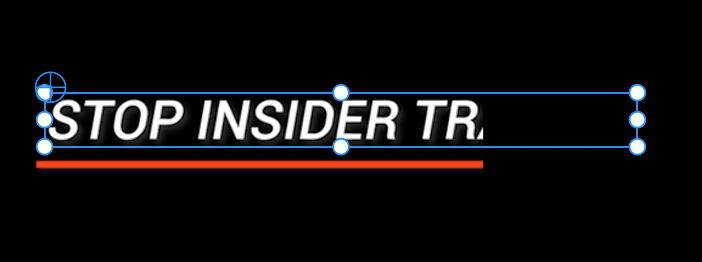
    Hi I’m using an Adobe Essential Graphics for text. However, when I scale up the font size, the text gets cut off, see attached #1.


    When I scale the font size down, the text isn’t cut off, see attached #2.

    Any ideas why this is or how to get around it? I tried scaling the font down and then increasing the scale size in the motion tab, however when I do that the text is visibly lower resolution.

    Any ideas? Thank you!

    Ivan Eldredge replied 1 year, 6 months ago 3 Members · 2 Replies
  • 2 Replies
  • Mary Gerber

    October 9, 2024 at 1:53 pm

    I’m having this same problem, did you find a solution or reach out the Adobe? I’m replying to maybe get this back out there. Thanks for doing this.

  • Ivan Eldredge

    October 9, 2024 at 2:29 pm

    Hello!

    This issue often occurs when text is scaled, resized, or modified at the graphic clip level, rather than within the individual text layer. To address this, please ensure that adjustments to the text size or properties are made directly within the specific text layer in the Essential Graphics panel, instead of using the Motion settings.
    Please check if this resolves the issue. Thank you!
    Best,

    Ivan Eldredge G.

We use anonymous cookies to give you the best experience we can.
Our Privacy policy | GDPR Policy