Creative Communities of the World Forums

The peer to peer support community for media production professionals.

Activity Forums Adobe Encore DVD Encore CS3 – C++ Runtime Error? Please Help

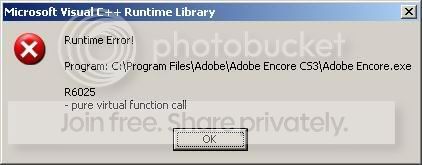
  • Encore CS3 – C++ Runtime Error? Please Help

    Posted by Stephen Rutherford on April 22, 2008 at 9:24 pm

    Please help if you know what this means.

    I was working with a project and Encore kept locking up and I would “end task”/force quit to dump the program. When I tried to open my project again, this error comes up.

    I am up against a Friday deadline…

    Thanks.

    Stephen Rutherford

    Graphics Producer: Gale Force Media, CanesVision & Wolfpack TV

    st******@****************es.com

    CAROLINA HURRICANES: 2006 STANLEY CUP CHAMPIONS!

    Christiaan Benus replied 15 years, 11 months ago 3 Members · 4 Replies
  • 4 Replies
  • Jeff Bellune

    April 22, 2008 at 9:47 pm

    Do you have any kind of USB stick/thumbdrive attached?

    Do you have a CD-ROM or CD-RW drive attached to your computer? If so, try disabling it through Device Manager temporarily and see if that helps.

    Finally, read all of the posts in this Adobe U2U Forum post

    -Jeff

    The Focal Easy Guide to Adobe Encore DVD 2.0

  • Stephen Rutherford

    April 22, 2008 at 10:28 pm

    Nothing external… I have two internal drives, one CD-R and one DVD-R. I disabled the CD-R and it is still having issues.

    I acutally began building my project from the ground up after this, and things were going well until I imported the subtitles…

    The “End Now” dialog popped up and when I clicked to “learn more” about the problem, the following was generated (two seperate instances noted):

    INSTANCE 1

    AppName: adobe encore.exe AppVer: 3.0.1.8 ModName: sonicauthorcore.dll

    ModVer: 3.0.0.268 Offset: 004e4e20

    INSTANCE 2

    AppName: adobe encore.exe AppVer: 3.0.1.8 ModName: sonicauthorcore.dll

    ModVer: 3.0.0.268 Offset: 004e5f18

    I’m guessing the “sonicauthorcore.dll” is screwy? Should I attempt to re-install this particular .dll (or even Encore alltogether)?

    Thanks again!

    Stephen Rutherford

    Graphics Producer: Gale Force Media, CanesVision & Wolfpack TV

    stephenr@carolinahurricanes.com

    CAROLINA HURRICANES: 2006 STANLEY CUP CHAMPIONS!

  • Stephen Rutherford

    April 22, 2008 at 11:44 pm

    I just reinstalled Encore from the CS3 DVDs… It said it successfully repaired Encore. However, I still got an error message when I attempted to open my project:

    AppName: adobe encore.exe AppVer: 3.0.1.8 ModName: backendlib.dll
    ModVer: 3.0.0.0 Offset: 003964ed

    Different ModName .dll from before with the same results.

    Stephen Rutherford

    Graphics Producer: Gale Force Media, CanesVision & Wolfpack TV

    stephenr@carolinahurricanes.com

    CAROLINA HURRICANES: 2006 STANLEY CUP CHAMPIONS!

  • Christiaan Benus

    May 25, 2010 at 2:12 pm

    hi,
    my name is Christiaan and i am from Europa.
    i have the same problem as you do.
    i found a temporary solution to the problem.
    make a new Windows account whit administrator rights.

    now i can us encore again.

    greetings, Christiaan

    hi

We use anonymous cookies to give you the best experience we can.
Our Privacy policy | GDPR Policy