Creative Communities of the World Forums

The peer to peer support community for media production professionals.

Activity Forums Adobe After Effects Editing Motion Paths

  • Editing Motion Paths

    Posted by Sasanka Srinivas on January 6, 2022 at 6:16 pm

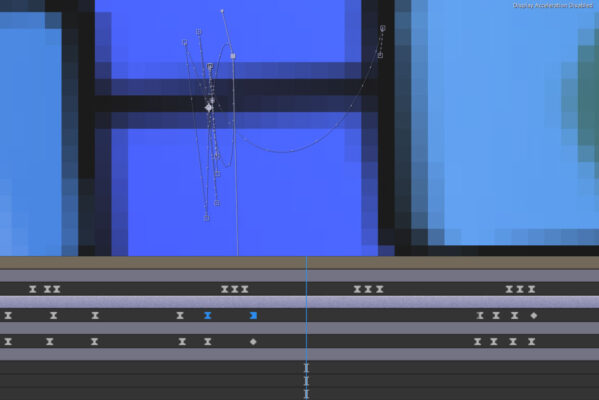
    If you have a shape that’s moving around a lot and want to edit the bezier handles of it’s motion path you can click on the keyframes and edit as shown. Unfortunately, as you can see it shows the paths of every keyframe on that shape, which makes editing one of them a nightmare. Is there a way to blind the keyframes you don’t need, showing just the ones you need? I’m sure someone has found a workaround for this somewhere….would be really useful!

    Sasanka Srinivas replied 4 years, 4 months ago 2 Members · 3 Replies
  • 3 Replies
  • Sasanka Srinivas

    January 6, 2022 at 6:25 pm

    Here’s the image of what I mean..

  • Walter Soyka

    January 6, 2022 at 6:50 pm

    In Preferences > Display, you can choose from several options for the display of motion paths. In your case, it might best to set “No more than x Keyframes” and use a lower value like 2 or 3.

  • Sasanka Srinivas

    January 6, 2022 at 7:18 pm

    That’s awesome, thanks!

We use anonymous cookies to give you the best experience we can.
Our Privacy policy | GDPR Policy