-
Easing and interpolation in text script problem
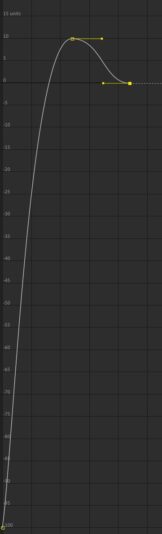
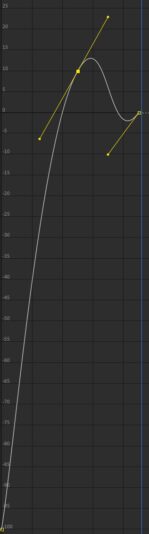
Hallo, i want to make a script that animates a text layer behind a mask kind of style and found some ae presets that i used for this. Now i want to put this into a script but when i animate the keyframes through my script the interpolation of the easing is different instead of it being horizontal (see graph screenshots) and so it bounces under the value of the 3rd keyframe.
First image is the easing i want and what i would get if i just add easing though a plugin like motion and second image is what i get from my script.The script:
//Easing
var ease1 = new KeyframeEase(25, 25);
var ease2 = new KeyframeEase(50, 50);
var ease3 = new KeyframeEase(65, 50);
//Undo Group to undow the action
app.beginUndoGroup(“AnimateShapelayer”);
//Code
var comp = app.project.activeItem;
var layers = comp.selectedLayers;
for (var i = 0; i < layers.length; i++) {
if (layers[i] instanceof TextLayer) {
var textslider = layers[i].property(“Effects”).addProperty(“Slider Control”);
var makeAnimator = layers[i].Text.Animators.addProperty(“ADBE Text Animator”);
makeAnimator(“ADBE Text Selectors”).addProperty(“ADBE Text Selector”);
var makeAnimatorProperty = makeAnimator(“ADBE Text Animator Properties”);
makeAnimatorProperty.addProperty(“ADBE Text Position 3D”);
layers[i].property(“ADBE Text Properties”).property(“ADBE Text Animators”).property(“ADBE Text Animator”).property(“ADBE Text Animator Properties”).property(“ADBE Text Position 3D”).expression = ‘sl=effect(“Slider Control”)(“Slider”); y_anim=thisLayer.sourceRectAtTime().height * sl/100*-1.4; x_anim=0; x=transform.anchorPoint[0]+x_anim; y=transform.anchorPoint[1]+y_anim; [x,y]’
layers[i].property(“Masks”).addProperty(“Mask”);
layers[i].property(“Masks”).property(1).property(“Mask Path”).expression = ‘const layerMidPoint = (outPoint – inPoint) / 2; const { height, width, top, left } = sourceRectAtTime(layerMidPoint); const topL = [0, -500]; const topR = [width, -500]; const bttmR = [width, height]; const bttmL = [0, height]; const pathPoint = [topL, topR, bttmR, bttmL]; const pathPointUpdated = []; pathPoint.forEach(item => pathPointUpdated.push(item + [left, top])); createPath(pathPointUpdated)’
var sliderKeys = layers[i].property(“ADBE Effect Parade”).property(1).property(“ADBE Slider Control-0001”);
sliderKeys.setValueAtTime(0, -100);
sliderKeys.setValueAtTime(0.5, 10);
sliderKeys.setValueAtTime(0.9, 0);
sliderKeys.setTemporalEaseAtKey(2, [ease3]);
sliderKeys.setTemporalEaseAtKey(3, [ease2]);
}
}
app.endUndoGroup();