Creative Communities of the World Forums

The peer to peer support community for media production professionals.

Activity Forums Adobe Premiere Pro DV PAL codec – have I imported well?

  • DV PAL codec – have I imported well?

    Posted by Matt Blandford on September 26, 2023 at 3:41 pm

    Hi,

    I imported a bunch of DV tapes using Premiere Pro a few years ago. Now I want to edit them and I’m wondering have I imported them in the best way possible? I was assuming that I was importing with no compression.

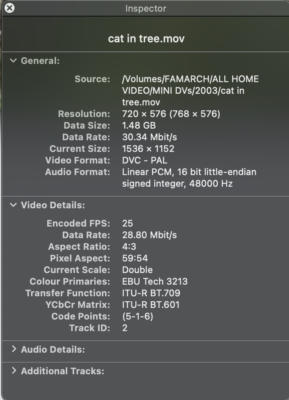
    I’m looking at the codec information in Quick Time Player and thinking was the data rate high enough? Why is it saying “Current Scale – double” and not Actual Size?

    I’ve posted a screenshot of the movie inspector window on what is about a 7 minute clip.

    Can anyone tell if this looks ok? I’ve seen some people online who have used iMovie to import DV using ProRes 222. Is that overkill? Or should I think about re-importing?

    Ann Bens replied 2 years, 7 months ago 3 Members · 7 Replies
  • 7 Replies
  • Ann Bens

    September 26, 2023 at 5:32 pm

    Please use https://mediaarea.net/en/MediaInfo

    for analyzing the clip. And post outcome in treeview.

  • Mads Nybo jørgensen

    September 27, 2023 at 12:44 am

    Hey Matt,

    Now I want to edit them and I’m wondering have I imported them in the
    best way possible? I was assuming that I was importing with no
    compression.

    Keep in mind that DV PAL would already come with a lot of compression, then there would always be compression involved. Going to a .mov uncompressed may make it easier to work with in Premiere Pro, but the feel and look of the original PAL DV format will still be there.

    Why is it saying “Current Scale – double” and not Actual Size?
    You will find the answer in your screen shot, in the above box “General”:
    Resolution: 720 x 576 (768 x 576)
    Current size: 1536 x 1152

    Is it fair to assume that your Mac screen is not 4:3 PAL.
    If your Quick Time Player is double size, filling out the screen for playback of the PAL footage, then the resolution will not match the Current size.

    Bigger question is: How and where do you want to use the footage?
    There are options for noise reduction, sharpening the image, cleaning up sounds and up-converting to HD/2K/4K.

    Hope this helps.

    Atb
    Mads

  • Matt Blandford

    September 27, 2023 at 8:41 am

    Thanks Ann,

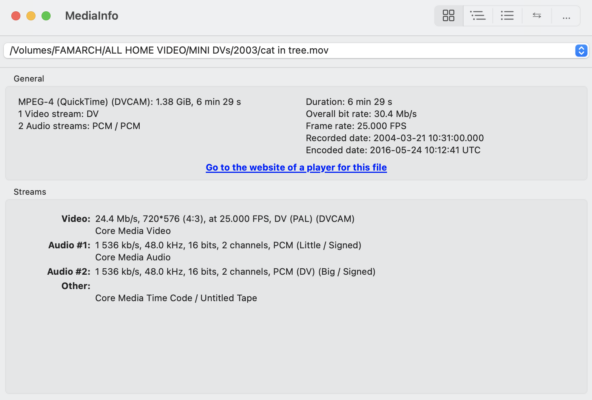
    Here is the mediainfo.

  • Matt Blandford

    September 27, 2023 at 8:45 am

    Thanks Mads,

    This is just home video shot on a miniDV camera. I want to edit it so that it’s shorter and more presentable but I want to output the finished content at both 1:1 for archive and as a smaller mp4 file for sharing.

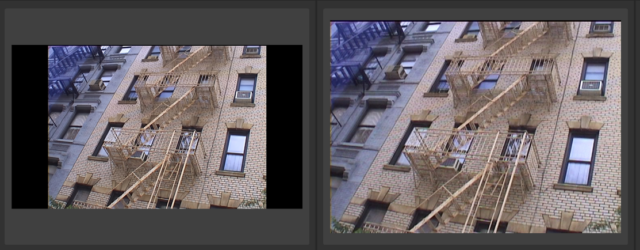
    At the moment, I’m just shocked at how poor the quality looks in this day and age of HD and 4K! I remember in the 90s and 00s thinking miniDV was the bees knees!

  • Mads Nybo jørgensen

    September 27, 2023 at 8:59 am

    Hey Matt,

    I know the feeling – currently going through digitizing my old library of PAL Betacam SP and DV-Cam tapes. It looked amazing back then, now it looks like something that could have been shot on VHS.

    You might be able to “sharpen” the footage slightly and/or make it more crisp using the PPro grading tools.

    However, I would advice you to your edit as an “off-line” (No grade and No graphics) and push it through Topaz AI Video. I’ve had some good result from doing that to archieve footage, and to 4K source footage gone bad.

    They do offer you to take it for a free run with a watermark.
    https://www.topazlabs.com/topaz-video-ai

    If you don’t want to purchase (I got my license on one of their deals), you should be able to find people who will be able to do it for you.

    Atb
    Mads

  • Matt Blandford

    September 27, 2023 at 9:17 pm

    Thanks Mads,

    I’ll have a play with Topaz with the trial. Looks interesting.

    Matt

  • Ann Bens

    September 28, 2023 at 12:58 pm

    Mediainfo: TREEVIEW please.

    Of course its bad quality its SD.

    I used Topaz to convert mini DV into 1280×720 prores but leaving the Black vertical bars, and cc in Premiere.

We use anonymous cookies to give you the best experience we can.
Our Privacy policy | GDPR Policy