

Activity › Forums › Adobe After Effects › Duration for Imported Photoshop Layers
-
Duration for Imported Photoshop Layers
Matthias Stoll replied 10 months, 1 week ago 10 Members · 17 Replies
-

Mikhail Konovalov
October 11, 2016 at 9:32 pm[Roei Tzoref] ” I find the integration between rotoscoping in Ps, and video in Ps with Ps->Ae workflow fascinating”
Perhaps; I haven’t tried any of that.
“all of your layers were imported as sequences. you can see it by the icon.”
Yes, I can see the icon and I can read the source item summary at the top of the project window. They are imported as sequences, 5 seconds @ 25fps. This is the problem, indeed. However:
“you should import them with the sequence unchecked. “
Y U NO beeleave me?! That’s what I did. I made a separate screen shot just for that but didn’t post it: it being a separate screen shot, wouldn’t convince you of anything. OK, I’ll capture a video of the whole process and post a public link below. Having been using After Effects since version 4.0 in the late 90’ies, I wouldn’t have missed a checkbox. I import it as still layers, it gets imported as sequences. That’s the problem.
“still you are correct, it seems that when you import a video timeline that has a video layer all of your layers will be imported with the duration that was set for them in PS.”
I cannot be correct on that, having never stated it; however, the statement itself is incorrect. As it is apparent from the screenshots, the layers’ duration is 2:00 in Photoshop but 5:00 in the After Effects. No interpretation can be guilty of that: for a non-video, static-by-nature, one-frame Background of the PSD to become 5 second in length, it would have to be either interpreted at 0,008 fps (the project window summary unequivocally displays that it is at 25 fps, my default for the sequences), or contain 125 frames: impossible, too, as I hope you’ll agree.
Here is the video recording of the process anyway: https://drive.google.com/file/d/0B1mvi9KB-6D1UEE5aGJjRWIxeHc/view?usp=sharing
“(beautiful animation BTW)”
Thanks; it’s not mine, however. I’m only trouble-shooting this.
Thanks once again.
-

Roei Tzoref
October 11, 2016 at 10:16 pm[Mikhail Konovalov] “OK, I’ll capture a video of the whole process and post a public link below. Having been using After Effects since version 4.0 in the late 90’ies, I wouldn’t have missed a checkbox. I import it as still layers, it gets imported as sequences. That’s the problem.”
in your recording indeed the sequence checkbox is unchecked and your layers were imported as psd layers with duration, and not with the sequence Icon like before. this is from your recording:

this is from before:

it’s all the same of course because they do have duration all the same. but in unlike the recording, in the previous screenshot it is psd sequence simply because it has the icon of a sequence is where I am getting at.
[Mikhail Konovalov] “I cannot be correct on that, having never stated it; “
I only meant to acknowledge that there is a problem with layers with a duration even though they are not a sequence in the context of the thread. bad phrasing on my part, I apologize.[Mikhail Konovalov] ” As it is apparent from the screenshots, the layers’ duration is 2:00 in Photoshop but 5:00 in the After Effects. “
yes, in your screenshots it is 2 seconds in Ps, and 5 seconds in Ae. but the file you uploaded opens in my photoshop 2015.5 like this:

5 seconds. so I have 5 seconds in Ps and 5 seconds in Ae. btw I don’t have a ruler for the time units at the top of the timeline panel.. where do I switch it on?as for why this is happening where frame layers are imported in limited time… obviously some bug or I suspect that Video Timeline workflows in conjunction with Ae is relatively new and uncharted territory. but we can get by. what about the workarounds I suggested?
Roei Tzoref
After Effects Artist & Instructor
♫ Ae Blues Tutorials -
Mikhail Konovalov
October 11, 2016 at 10:57 pm[Roei Tzoref] “what about the workarounds I suggested?”
You type faster than I do. I started answering in a postscriptum edit to my post to follow-up on those, but seeing your reply now, discarded it.
The “2*” is perhaps indeed the best as a workaround and witty enough for me not to have figured it on my own, thanks, but it only “kinda” works if I extend only one layer. Whichever is not extended (in the Photoshop Timeline) gets its Out point to move but visibly dissapears as if having its Opacity set to zero at its last frame in Photoshop. I haven’t yet had the time to test it thoroughly enough, oddly some layers follow this behavior, others don’t. Has to be fiddled with a little more, and as bad luck must have it, opening it directly from the cloud-synced Google Drive directory somehow damaged it and I cannot open it anymore, so untill I once again have access to the original.
The “3” will have to wait for the same but technically appears even more crutchy than time remapping.
My chief wonder had been whether it was a bug or some new feature that I missed or haven’t figured out. Now that it’s settled, nothing’s bugless. Thanks for clearing this up.
“in your recording indeed the sequence checkbox is unchecked and your layers were imported as psd layers with duration, and not with the sequence Icon like before”
This is a different computer now, with perhaps different file associations (although should be the same unless someone changed something), and besides the icon, the summary in the Project window is still of a sequence (having temporarily lost the access to the original file, I cannot look up the interpretation dialogue now). A still would not have properties such as frame rate listed in its attributes. **
“it’s all the same of course because they do have duration.”
They have a fixed duration and thus behave as a sequence… while not being a sequence. This is some new breed then, so far it used to be either one or the other. Or it’s simply a bug, which then alleviates all investigation, being the end of it. Where there are bugs, are workarounds.
“5 seconds. so I have 5 seconds in Ps and 5 seconds in Ae.”
Whoops. My bad, then, sorry. There must have been versions of the file with the same name that I have mixed up. It’s then at least logical for the durations to coincide, no black magic.
Thanks for taking part in untangling this!
** EDIT: And, do or do not take my word for it, but for the previous screenshot showing the source items with a sequence icon next to them, I also imported the file with the Sequence unchecked.
-
Roei Tzoref
October 11, 2016 at 11:08 pmI agree, this is a new breed.
Thank you, this was fun and I learned something new ?
Roei Tzoref
After Effects Artist & Instructor
♫ Ae Blues Tutorials -

Biju Toha
May 27, 2017 at 4:50 amMikhail Konovalov! Thanks so much. Now it is working nice. Sorry, this is not my thread, but I’m going to feel the same issue here in my project. Finally, I’ve solved the issue by yours way. “I have something done to the PSD in the Photoshop’s own “Timeline” and I deleted that timeline. Once again thanks so much to all of here with Creative Cow!
-
Mikhail Konovalov
May 29, 2017 at 4:36 pmI’m so glad my experience helped someone out there. I remember how tough it had been to figure it out, no information whatsoever. Collective wisdom rules! :^)
-
Matthias Stoll
November 12, 2025 at 10:13 amHi everyone,
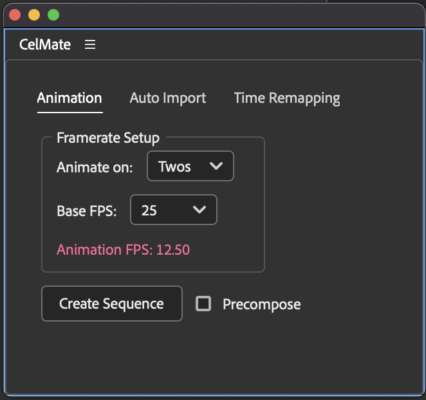
I created this free script “CelMate” to make this workflow quicker and also to avoid framerate troubles. Especially Adobe Fresco and Procreate have become great tools to create frame-by-frame animations, so this PSD-Layers-to-sequence-workflow got more important to me in the last years.
The script automates the entire process from importing the PSDs to managing the animations. You can batch-create layer sequences with one click. The script makes sure that your FPS is a correct fraction of your desired final FPS. Finally it creates loops (via expressions) that are not jerky – which is not as easy as it sounds. Also you can easily change the Framerate to try out other timings (on twos, on threes, on fours)
Its available for free on gumroad:
https://stollinski.gumroad.com/l/jvhdo
Reply to this Discussion! Login or Sign Up