-
Drag&Drop JPEG elements like in illustrator? (or workaround)
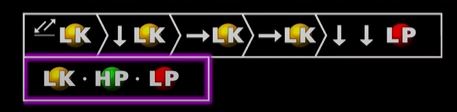
hey guys,ran into a huge timesink in my workflow that ive been trying to get around for over half a year. as you can see from the picture i really need to use my proprietary svg glyph font in order to make my videos. however, AE does not support it. it would be amazing if i could just (for example) press A on the keyboard and “arrow left” appears in ae. then i press L on the keyboard and “yellow lk circle” drops after it in ae. it would save me a ton of time. however it seems like theres no workaround for that. its a real pain to manually align all of that because theres 100s of of instances, always changing….but anyway….i was wondering if any of you know of a way, a plugin or a script that would allow me to import my prorietary character set (as jpegs) into it. and then i can just grab them and drop them into my composition as if they were “elements” (of sort). without them creating their own track on the timeline. kinda like as if they were visual clones of each other.
or , does anybody have any advice on how to streamline and clean up this workflow ? in the attached picture is a small sample (usually theres 5 times as much within the span of 30 seconds) and then i have to completely change the whole thing in the next 30 seconds. i need a clever workaround for this cause its killing me to keep aligning all of this by hand.
i need like a macro or something so that when i press a certain key on the keyboard, it draws the corresponding glyph from somewhere and places it down for me