Creative Communities of the World Forums

The peer to peer support community for media production professionals.

Activity Forums Adobe After Effects Downscaling a composition from 4K

  • Downscaling a composition from 4K

    Posted by Antoni Jones on July 28, 2021 at 10:30 am

    Hello I am fairly new to after effects but have a problem I just cannot solve.

    I have purchased the “Retro wave pack” by Constantuim off videohive which is a great pack containing 80’s retro titles, footages, backgrounds etc… but all the compositions are 4K (3840×2160) in resolution/size which I want to downscale to 1280×720.

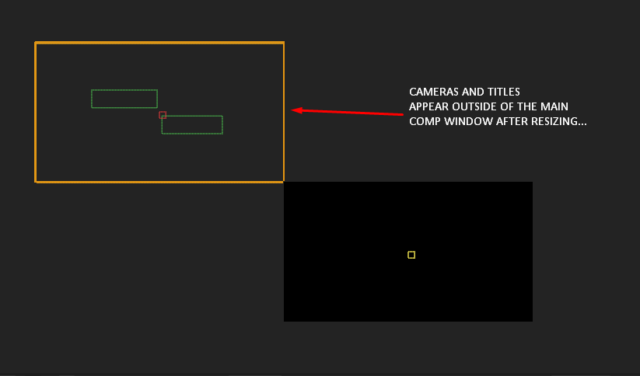
    I have tried resizing the compositions using basic composition settings which does not work. I have also tried resizing using the “scale composition” script and also one that I purchased called “rescursivescalecomp” which also resizes any nested comps to the required size. But because the comps contain 3D cameras and movement it always appears outside of the composition window and never scales correctly.

    Does anyone have any experience of downscaling compositions when using this pack or can help me solve this problem? I would be most grateful as right now I feel like I am banging my head against a wall.

    My problem for reference…. Thank you.


    Pierre Jasmin replied 4 years, 9 months ago 5 Members · 7 Replies
  • 7 Replies
  • Eric Santiago

    July 28, 2021 at 2:08 pm

    Can you just work in QHD (3840×2160) for now then downscale at export?

  • Antoni Jones

    July 28, 2021 at 3:14 pm

    I suppose I could but my PC isn’t the best and struggles somewhat. Guess I will have to muddle through it. Thanks for the response.

  • Chris Voelz

    July 28, 2021 at 3:21 pm

    Depending on how complex the comp is you could try to add a null object, pick whip everything to the null, and then scale the null down. If you do this make sure to pick whip everything with your scrubber at the end of your timeline.

    If your computer is struggling with the 4k comp this wont really free up an resources. Like Eric said it may best at this point to just work in the 4k space.

  • Eric Santiago

    July 28, 2021 at 3:45 pm

    Where it struggles is vector and math stuff.

    What you want to do is a lot of math 🙂

  • Walter Soyka

    July 28, 2021 at 6:29 pm

    FYI, the resizing method you’re describing here — adding a null, pickwhipping to it, and scaling the null down — is exactly how the “Scale Composition.jsx” script that ships with After Effects works.

    I agree that working at 4K and scaling down at render would probably be the best course of action, especially versus backwards-engineering a complicated template system.

    If your computer is struggling while you’re working, I’d suggest some performance tweaks like lowering the viewer resolution, turning off motion blur in the viewer, solo-ing just the layers you need, reducing the preview frame rate, using Draft 3D, using the region of interest, temporarily turning off effects on heavy layers, using proxies, etc.

  • Antoni Jones

    July 28, 2021 at 7:14 pm

    Thanks guys for all your replies, I will try to work at 4K with some performance tweaks to see if they will help before rendering out at a lower resolution.

    Thanks again.

  • Pierre Jasmin

    August 4, 2021 at 12:33 am

    I don’t disagree with solutions proposed, taking note that our Reframe plugin in RE:Lens should do that automatically for you, it does not (without one wiring expressions) – however I just checked and although not designed for that if you use RE:Lens Superfish, set Projection Mode to Fisheye and set Output size to Comp Size, you can open the Comp panel and interactively change the Comp Size if the Preview Button is checked and it will stay relatively in the same place (the image will scale to fit Comp Size)… OK not what it was intended for but there is always a way 🙂 – that’s the laziest way I could think of doing it 🙂

    Pierre

We use anonymous cookies to give you the best experience we can.
Our Privacy policy | GDPR Policy