Creative Communities of the World Forums

The peer to peer support community for media production professionals.

Activity Forums DaVinci Resolve DaVinci Not Playing Sound Or Registering Levels

  • DaVinci Not Playing Sound Or Registering Levels

    Posted by Avi Kendrick on January 30, 2025 at 2:24 pm

    Hello!

    I am relatively new to DaVinci so I may be doing something silly, but I am having an audio issue that I cannot figure out.

    I opened a file I was editing just two days ago (just audio in this file, no video as it is for a podcast) and I couldn’t play any sound. I tried closing and reopening the file, muting and unmuting the track(s), double checking DaVinci preferences to make sure the correct speaker/outputs were selected, using bluetooth headphones vs my laptop speakers, restarting the program, restarting my computer, uninstalling and reinstalling the program entirely, and even checking to make sure my computer speakers weren’t just muted or something.

    I opened a different DaVinci file, and the same issue happened, no sound playing despite me KNOWING there is sound there for sure. When I check the levels indicator in the editor tab, it’s currently not registering there being any sound to the file at all and is blank. I can still see the waveforms in the timeline, however.

    Thoughts? Have I just missed a silly little step or something?

    Brie Clayton
    replied 1 year, 2 months ago
    3 Members · 5 Replies
  • 5 Replies
  • Mads Nybo jørgensen

    January 30, 2025 at 3:39 pm

    Hey Avi,

    I suspect that it is a hardware/OS problem.

    But difficult to work out without the specs and software that you are using?

    I have myself recently experienced the audio not playing inside Davinci.
    So might be a bug in the latest release, although I did get my audio back.

    Atb
    Mads

  • Avi Kendrick

    January 31, 2025 at 4:17 am

    Hi!

    I am using DaVinci 19, version 19.1.3, running it on my MacBook. My Mac is using OS Sequoia 15.3 (though I had been using an earlier operating system recently, which gave me no trouble. I tried updating my computer as part of trying to fix this issue, but that did not help).

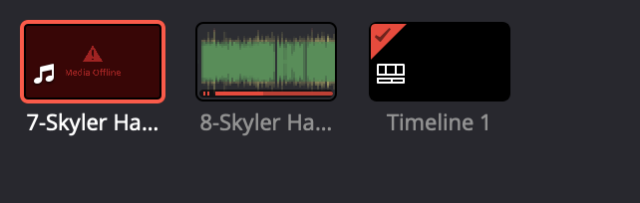
    I have been previously editing without any issue on this computer. The only thing that I did before this issue began was that I restarted my computer earlier that day. I am noticing that some of my media is giving me a “media offline” label when I check the bin though (I have added screenshots here). I haven’t moved the original files as far as I am aware, though.

  • Mads Nybo jørgensen

    January 31, 2025 at 10:49 am

    Hey Avi,

    I would suggest that you need to relink the media first, before looking at the other issues.

    Is your media on an external drive, or internal?

    Are you using proxy or full-resolution media (could be that the new OS have killed your proxies – not that it should, but…)

    Have you doen a test where you export the Davinci timeline, and oimport that in to a new project?

    Lastly, which you might already have done: Have you under preferences checked Davinci’s I/O settings?
    And, maybe for the headphones, check your Bluetooth settings?

    Hope this helps?

    Atb
    Mads

  • Avi Kendrick

    February 1, 2025 at 1:15 am

    I went back in and relinked all of my clips. That did solve the problem, which is fantastic. I didn’t notice earlier in the process because in the library only the clip that had video (which I had imported into the library but was not using) displayed the red warning that the clip wasn’t linked. The audio-only file, which was the one I was actually working with, didn’t give me any indication that there was a problem.

    I don’t know why they became unlinked in the first place since I didn’t move any of these files; either way, I’m glad I can edit again. Thank you for your help!

  • Brie Clayton

    February 19, 2025 at 1:26 am

    Thank you for solving this, Mads!

We use anonymous cookies to give you the best experience we can.
Our Privacy policy | GDPR Policy