[Paul Gregory] “I’m aware that some early 3D was made that way but I guess what I really want to know is if we captured 2 almost identical videos as described, whether or not the files could be edited in Vegas as is or is there some other steps that also must be undertaken to achieve a usable 3D video file.”
Yes. If you could capture 2 almost identical videos as described, you can tell Vegas Pro that they Left and Right eye images and they will display and edit in 3D in Vegas Pro.
The problem, as Stephen is trying to explain, is that you cannot shoot these images because the lenses need to be about 2 inches apart which means the video cameras would need to be less that 1 inch wide (side-by-side). The 3D dual camera systems have a special rig that used mirrors to get the lenses that close together while the cameras remained further apart.
You would have better luck using a single camera with something like a Panasonic VW-CLT2 3D Conversion Lens.
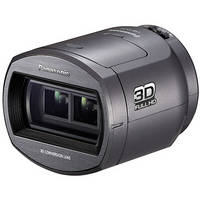
This would split a single image into left and right eye images that Vegas can then edit.
[Paul Gregory] “If Vegas can produce a usable 3D file this way could it be viewed an any 3D TV?”
Vegas can and it depends on the 3D TV. There is no such thing as “any 3D TV”. You have to match the format to the technology that the TV uses.
[Paul Gregory] “I have noticed that 3D TV’s either use an active or passive system that require different types of glasses. Some have all of the depth displayed behind the screen yet other TV’s can display images that start at the screen & can come out towards you.”
Now you are starting to appreciate the depth of the problem. There are several 3D standards and you have to use the same one that your 3D TV uses. One way is to render your clip using the Sony AVC/MVC in Stereoscopic 3D mode and burn it to Blu-ray and buy a 3D Blu-ray player. The description on the Panasonic VW-CLT2 3D Conversion Lens seems to suggest that a 3D TV can play the AVCHD 3D files produced by this lens. I have no personal experience with it to say as I don’t own a 3D TV or the lens.
~jr
http://www.johnrofrano.com
http://www.vasst.com


