Creative Communities of the World Forums

The peer to peer support community for media production professionals.

Activity Forums Adobe After Effects Expressions Count Shape Layers

Tagged: 

  • Count Shape Layers

    Posted by Tavo Galvez on June 25, 2023 at 1:00 am

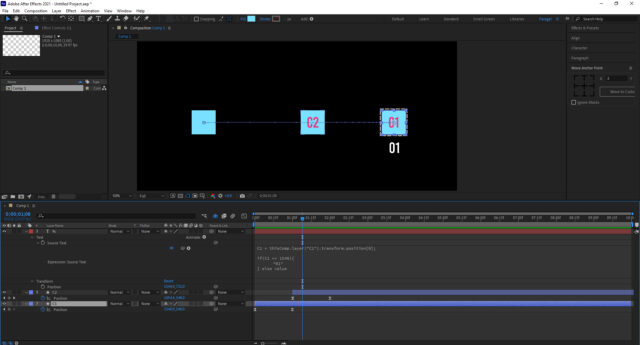
    Hi, I am new to after effects expressions and I would like to know if there is an expression that counts the shape layer or shows me the written text when the shape layer reaches a point in the position.

    In the image C1 when it reaches the dotted rectangle changes the text to 01, I would like that when the C2 reaches the position of the dotted rectangle also changes the text…and so the shape layers. Thanks.

    Tavo Galvez replied 3 years ago 2 Members · 4 Replies
  • 4 Replies
  • Filip Vandueren

    June 26, 2023 at 9:55 am

    Hey Tavo,

    do you want to count how many layers are hitting the target at the same time ?

    So if C1 and C3 would overlap in the square it would be resulting in 2 ?

    Do you want the position to be very precise, or is it more of a collision check: when the squares touch, they count ?

  • Tavo Galvez

    June 29, 2023 at 5:19 am

    Hi Filip and thanks, yes I want to know how many layers are hitting the target.

    I want to know how many layers are hitting the target, so I want to know how many layers are hitting the target.

    Either by collision or by position. If a shape layer reaches that point that the text change to 1, if another shape layer arrives, change to 2 and so on, the problem is that I can not get it with expressions.

  • Filip Vandueren

    June 29, 2023 at 9:33 am

    Here’s one way to do it:

    assuming I want to check three layers that are layers 1, 2, and 3 and see if their position is less than 100 pixels form my target layer.

    I’m also assuming non of these layers are parented for now.

    I would give the text-layer’s sourceText property this expression:

    num = 0;
    for (i=1; i<4; i++) {
    if (length(thisComp.layer(i).position - thisComp.layer("target").position)<100) {
    num++;
    }
    }
    num;

    This straight line distance works better for 100×100 circles. You could change it to <1 and it will only count if they are at the exact same location.

    For squares that are all 100×100 pixels this kind of check is maybe better:

    num = 0;
    for (i=1; i<4; i++) {
    if (
    Math.abs(thisComp.layer(i).position[0] - thisComp.layer("target").position[0])<100
    &&
    Math.abs(thisComp.layer(i).position[1] - thisComp.layer("target").position[1])<100
    ) {
    num++
    }
    }
    num

  • Tavo Galvez

    June 29, 2023 at 3:14 pm

    Thank you very much Filip, the expression works correctly.

We use anonymous cookies to give you the best experience we can.
Our Privacy policy | GDPR Policy