Creative Communities of the World Forums

The peer to peer support community for media production professionals.

Activity Forums Adobe Premiere Pro Could you please tell me the format of this teaching video?

  • Could you please tell me the format of this teaching video?

    Posted by Mira Brooks on September 19, 2020 at 6:12 pm

    Hi Everyone!


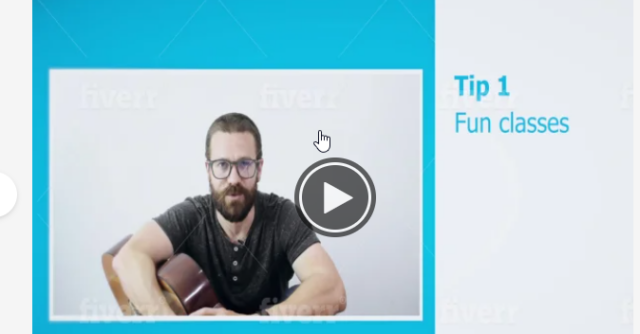
    I would like to start making teaching videos and I would really like a smaller video of me on the side and points that appear to the side of me as I discuss them. I have attached an image explaining what I mean.

    I plan to look for tutorials or figure out on Premiere Pro how to accomplish this. If anyone could provide any clarity on the format of this video, I would greatly appreciate it.

    Mira Brooks replied 5 years, 11 months ago 3 Members · 6 Replies
  • 6 Replies
  • Jim Scott

    September 21, 2020 at 1:40 pm

    Set up your sequence settings for the desired output, and then scale and position your video (“Motion” tab) to appear on one side. On separate tracks add text (Graphics > New Layer > Text, or CMD T) for the tips, and background graphics (colored rectangle, for example, placed beneath the video track).

  • Mira Brooks

    September 24, 2020 at 4:55 pm

    Thanks so much, Jim. That was very helpful.

    One more question – hopefully you don’t mind. Do you have any ideas for how to make bullet points appear as I speak? I tried to do a mask that pans down at certain points in the video to reveal the text. However, the bullet point text slowly appears when the video plays. I’d rather have the bullet point text just appear.

  • Jim Scott

    September 24, 2020 at 6:30 pm

    Glad to help.

    Make each bullet point a separate text layer and place it in the timeline where you want it to start, and then keyframe its opacity to fade in/out if desired. You can drag the ends of the text layers to adjust their start and end points.

  • Andy Ford

    September 24, 2020 at 11:03 pm

    you can also always open videos in quicktime and use the Get Info feature to find the video codec, frame rate, frame size, and bitrate

  • Jim Scott

    September 24, 2020 at 11:27 pm

    Thanks Andy. I may be wrong, but I got the impression that by “format” Mira was asking how to set up the example image in Premiere, as in “formatting” a word processing document, book, or graphic — to arrange or set up.

  • Mira Brooks

    October 6, 2020 at 9:52 pm

    Thanks Jim/Scott!

    I was asking about the aesthetic and layout of the video and will definitely try to change the opacity for the bullet points. This will really help improve my videos so I appreciate your assistance with this.

We use anonymous cookies to give you the best experience we can.
Our Privacy policy | GDPR Policy