Creative Communities of the World Forums

The peer to peer support community for media production professionals.

Activity Forums Maxon Cinema 4D Copying a pre-drawn spline into an existing spline object.

  • Copying a pre-drawn spline into an existing spline object.

    Posted by Simon Lucas on October 28, 2025 at 1:01 pm

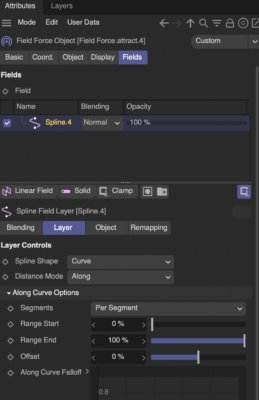
    I have an existing spline A used four times in three different field force objects. Emitter Particles follow the spline. The force objects’ spline layers all have custom settings

    I want to replace that spline A with a different exisiting spline B and retain all settings in the force objects.

    If I connect and delete spline A with the new spline B, the new spline is no longer followed by the particles. It is like the forces are no longer linked to the exisiting spline A. The updated spline is no longer recognised as the same spline.

    If I use structure manager to copy and past all the points in spline A, then select spline B ready to paste, C4D r25 crashes.

    Is there another way to replace a spline and have the force fields automatically update their field layers splines to reflect the new spline? Or ‘relink’ the splines without losing their layer settings?

    Kouraib Abdmalek
    replied 6 months, 2 weeks ago
    3 Members · 10 Replies
  • 10 Replies
  • Kouraib Abdmalek

    October 29, 2025 at 10:39 am

    Hi Simon,

    I think you could do this using the MoSpline tool, as shown in the screen recording below. I hope this helps.

  • Simon Lucas

    October 29, 2025 at 10:43 am

    I have worked out what is going on here. There is a problem using structure manager to copy and paste spline points from one spline object to another spline object fails under a specific circumstance. A circumstance I did not identify in my opening post. This applies to versions r25 and 2023. And there is a work-around.

    The PROBLEM is to do with using edge-to-spline created splines.:

    1. Create a sphere. Make it editable with ‘c’. Select an edge loop on the sphere. Use ‘edge-to-spline’. Throw away the sphere an keep the resulting ‘sphere.spline’ object.

    2. Create an empty spline.

    3. Open the Structure Manager.

    4. Select sphere.spline and use select all in Structure Manager. Copy the list of selected points.

    5. Select the empty spline. Paste. Either nothing happens or c4d beach-balls. Certainly the beach-balling will happen on a second attempt, I think.

    SOLUTION

    Do everything as before but with the following changes

    3. Create a square. Use ‘c’ to turn it into a Spline object.

    5. Select the square-now-spline object. Paste. Then delete the square’s points.

    In my case I have to make sure I start with square-turned-to-spline objects when setting up my original multiple Force Object templates.

  • Kouraib Abdmalek

    October 29, 2025 at 10:49 am

    I’m glad for you! but I think using a MoSpline like I do in the video attached to my previous post is much easier. Have you tried that?

  • Simon Lucas

    October 29, 2025 at 10:54 am

    Hi Kouraib

    thank-you. I think I was typing up my post as you posted yours.

    I’ve not used MoSpline and not totally sure what you did there. Did you turn the first Spline into the second spline Spline.1 using MoSpline?

    I’m all for easier solutions! I need to look at MoSpline.

  • Kouraib Abdmalek

    October 29, 2025 at 11:08 am

    You’re welcome, Simon! Yes, you can use the MoSpline tool to set any Spline as a reference and then make another Spline match it exactly. After that, you just need to disable MoSpline to restore everything to its original state. I explained the steps in the video. This tool is fantastic, and I usually use it to solve problems related to Splines. I highly recommend you try it.

  • Simon Lucas

    October 29, 2025 at 11:17 am

    Hi Kouraib

    that’s amazing. I just tried a simple example, and now will try it in my full set-up.

    Thank-you!

  • Kouraib Abdmalek

    October 30, 2025 at 8:06 am

    Hi Simon

    That’s great! Please let us know if it worked for you with the full set-up so everyone can benefit.

  • Simon Lucas

    October 30, 2025 at 11:03 am

    It works thank-you!

    A couple of points for anyone else trying this.

    a. Exclude the turbulance field from the moSpline – otherwise the destination spline (the on neing used in the field forces will go crazy. I excluded all the forces for good measure.

    b. The MoSpline appears to be destructive, as the original spline cannot be restored even after removing the MoSpline. So I have a destination spline and two splines used as alternative sources, as desired.

    See the example I attach.

  • Brie Clayton

    October 30, 2025 at 2:14 pm

    Thank you for solving this issue, Kouraib!

  • Kouraib Abdmalek

    October 31, 2025 at 10:52 am

    You’re very welcome, Simon! I’m glad it worked for you. Thanks for the feedback; I’ll check the attached file to benefit from it.

We use anonymous cookies to give you the best experience we can.
Our Privacy policy | GDPR Policy
