

Activity › Forums › Maxon Cinema 4D › Coordinates dialogue and object coordinates still don't jive
-
Coordinates dialogue and object coordinates still don't jive
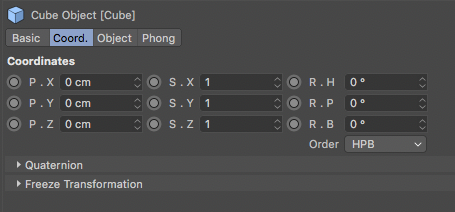
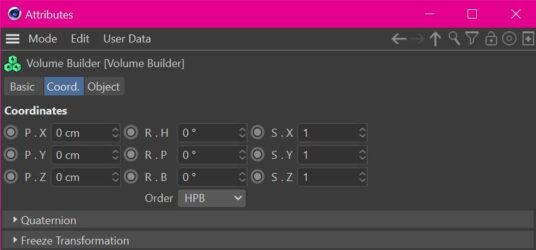
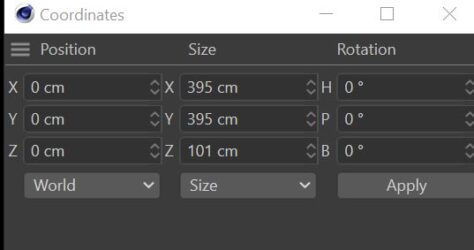
Posted by Steve Bentley on September 19, 2021 at 10:37 pmCan some one tell me why (or tell me how to fix this) the coordinates dialogue goes: Position, Size, Rotation, but the Objects dialogue box goes Position Rotation Scale?
Sorry if I’m missing the vital intricacies of UI design here. Or should I just cross my eyes?
Jim Scott replied 4 years, 12 months ago 3 Members · 5 Replies -
5 Replies
-

Jim Scott
September 20, 2021 at 2:09 amThe “why?” is because they want to mess with your head. I’m guessing that is a change in R24, because I don’t remember seeing a prior version (at least through R22) that had the Objects dialogue box in that order. Unless I’m losing my mind it’s always been PSR as pictured below. And I don’t know of any preference setting to change it.

-

Steve Bentley
September 20, 2021 at 2:30 amOh good – at least it’s not screen dependent dyslexia. I can now officially call this dumb.
Thanks for the sanity check.
-
Steve Bentley
September 20, 2021 at 2:33 amHow did you add that image so nice and clean? Mine gets cut off by the image box in the Cow (which hides the header of the dialogue I was trying to show). Maxon isn’t programming the Cow now are they?
-

Zeyd Ayoob
September 20, 2021 at 7:35 amAlso see absolutely no reason for this. I can tolerate sudden interface changes if they are either explained, or obviously beneficial. This has just been dropped on us without any care taken, as I can see.
-
Jim Scott
September 20, 2021 at 2:01 pmI just hit the camera icon at the bottom of the reply window and dragged the screenshot into the resulting box. I think because it was a small screenshot it didn’t get cut off like larger ones will. The COW’s upload and display process has changed over the years and is sometimes less than optimal.
Reply to this Discussion! Login or Sign Up