Creative Communities of the World Forums

The peer to peer support community for media production professionals.

Activity Forums Adobe After Effects Expressions Convert Selected Keyframes to Markers with custom label(marker color)

  • Convert Selected Keyframes to Markers with custom label(marker color)

    Posted by Eva Boe on July 17, 2023 at 5:39 pm

    I want a slightly modified version of the in-built script Convert Selected Properties to Markers.jsx.

    I want the markers created to be color Red for example and the marker comment to be empty and duration 0:00:00:00.

    I used chatgpt and provided me with this;

    var selectedProperty = app.project.activeItem.selectedProperties[0];

    var markerStream = selectedProperty.propertyGroup(1).property(“Marker”); // Get the marker stream of the selected property

    for (var i = 1; i <= selectedProperty.numKeys; i++) {

    var keyTime = selectedProperty.keyTime(i);

    var markerValue = new MarkerValue(“”); // Empty comment

    markerValue.label = 14; // Set the marker’s label color to red (index 14)

    markerStream.setValueAtTime(keyTime, markerValue);

    }

    but when run the scriptlet (using Kbar > Run Scriptlet), I get the error

    “unable to execute script at line 11. null is not an object”

    Please help me. 🙏🙏

    Brie Clayton replied 3 years ago 3 Members · 9 Replies
  • 9 Replies
  • Dan Ebberts

    July 17, 2023 at 6:46 pm

    Something like this maybe:

    function ConvertKeyframesToMarkers(){
    var comp = app.project.activeItem;
    if (! comp || ! (comp instanceof CompItem)){
    alert("No comp active.");
    return;
    }
    var props = comp.selectedProperties;
    var prop;
    var layer;
    var marker;
    var markerVal = new MarkerValue("");
    markerVal.label =1; // red
    for (var i = 0; i < props.length; i++){
    prop= props[i];
    layer = prop.propertyGroup(prop.propertyDepth);
    marker = layer.property("Marker");
    if (! (prop.propertyType == PropertyType.PROPERTY)) continue;
    for (var j = 1; j <= prop.numKeys; j++){
    marker.setValueAtTime(prop.keyTime(j), markerVal);
    }
    }
    }
    ConvertKeyframesToMarkers();
  • Eva Boe

    July 17, 2023 at 8:18 pm

    Thank you very much Mr. Dan. Worked perfectly.

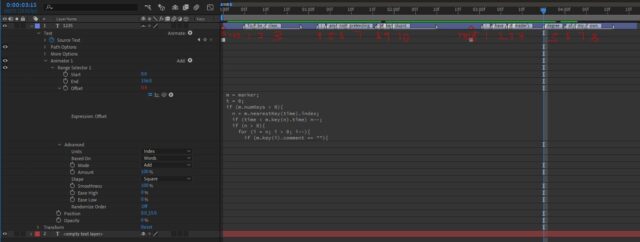
    While I have you, I’m working with this expression below to use marker’s index to count the number of markers and put in “Offset” value with a little easing.

    I want the value to start from 0 every time there is a marker with empty comment.

    // Check for markers

    numMarkers = marker.numKeys;

    // Assign value to marker index with easing

    if (numMarkers > 0) {

    nearestMarkerIndex = marker.nearestKey(time).index;

    markerTime = marker.key(nearestMarkerIndex).time;

    if (markerTime > time && nearestMarkerIndex > 1) {

    prevMarkerTime = marker.key(nearestMarkerIndex - 1).time;

    t = (time - prevMarkerTime) / (markerTime - prevMarkerTime);

    markerIndex = nearestMarkerIndex - 1 + ease(t, 0, 1, 0, 1);

    } else {

    markerIndex = nearestMarkerIndex;

    }

    } else {

    // No markers, set markerIndex to 0

    markerIndex = -1;

    }

    // Use marker index value

    markerIndex;

  • Dan Ebberts

    July 17, 2023 at 10:57 pm

    I’m not exactly sure what you’re after, but this is how I’d calculate how long it’s been since the last marker with no comment:

    m = marker;
    t = 0;
    if (m.numKeys > 0){
    n = m.nearestKey(time).index;
    if (time < m.key(n).time) n--;
    if (n > 0){
    for (i = n; i > 0; i--){
    if (m.key(i).comment == ""){
    t = time - m.key(i).time;
    break;
    }
    }
    }
    }
    t
  • Eva Boe

    July 18, 2023 at 4:04 am

    Yeah… something like this.

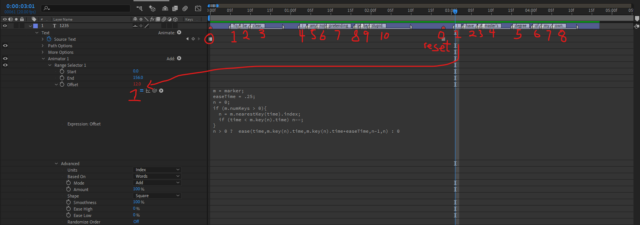
    The expression you provided works but it starts counting from .1 but I want to ease into 1 (first marker) and then 2 (second marker) etc.

  • Dan Ebberts

    July 18, 2023 at 5:08 am

    Something more like this maybe:

    m = marker;
    easeTime = .25;
    n = 0;
    if (m.numKeys > 0){
    n = m.nearestKey(time).index;
    if (time < m.key(n).time) n--;
    }
    n > 0 ? ease(time,m.key(n).time,m.key(n).time+easeTime,n-1,n) : 0
  • Eva Boe

    July 18, 2023 at 10:59 am

    No, not really.
    I want the empty markers to act like a “reset button” so the value starts with 1 at the marker after the empty “red” markers.

    Is that possible?

  • Dan Ebberts

    July 18, 2023 at 2:22 pm

    Ah, sorry, forgot that part. Try this:

    m = marker;
    easeTime = .25;
    n = 0;
    if (m.numKeys > 0){
    n = m.nearestKey(time).index;
    if (time < m.key(n).time) n--;
    }
    temp = n;
    c = 0;
    while (temp > 0){
    if (m.key(temp).comment == "") break;
    c++;
    temp--;
    }
    c > 0 ? ease(time,m.key(n).time,m.key(n).time+easeTime,c-1,c) : 0
  • Eva Boe

    July 18, 2023 at 2:51 pm

    Thank you once again Mr. Dan.

  • Brie Clayton

    July 18, 2023 at 4:07 pm

    Thank you for your solve, Dan!

We use anonymous cookies to give you the best experience we can.
Our Privacy policy | GDPR Policy