Creative Communities of the World Forums

The peer to peer support community for media production professionals.

Activity Forums Adobe After Effects Continuously Rasterize messing up artwork

  • Continuously Rasterize messing up artwork

    Posted by Guilherme Oliveira on April 16, 2021 at 1:57 pm

    Hello everyone

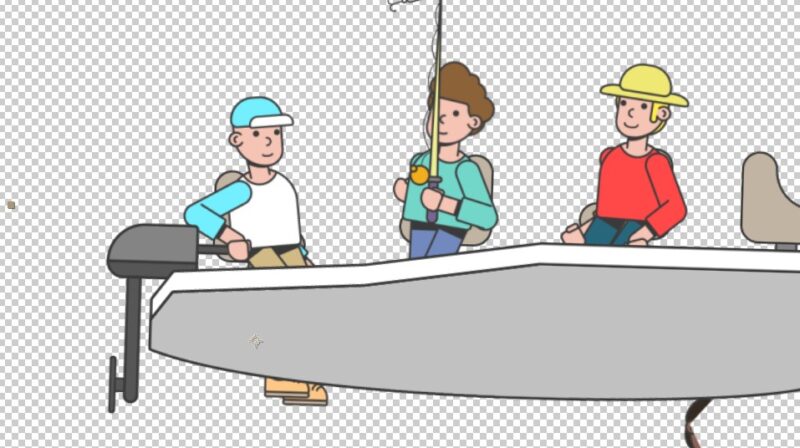
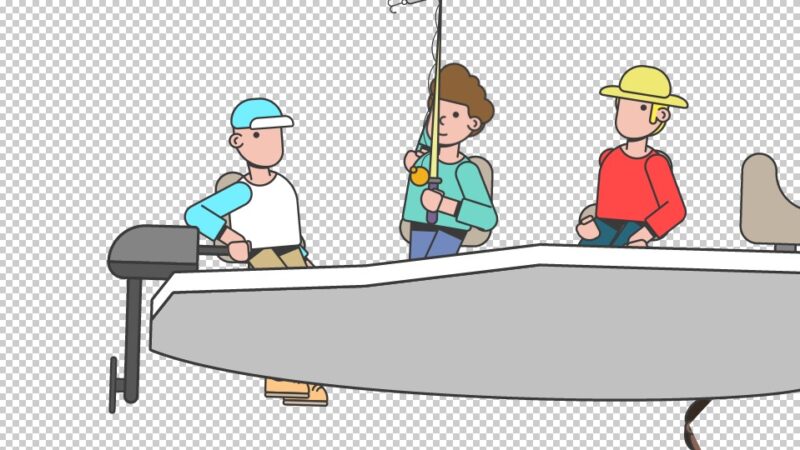
    I’m facing some issues with the Continuously Rasterize option. Every time I turn it on my artwork gets all messed up, some stuff shapes go missing (characters eyes), some other shapes get out of position (characters arms) and I can’t seem to find a solution.

    Here are a couple of images for reference

    Have you ever experienced this problem? Any fixes?

    Thanks in advance

    Chris Voelz replied 5 years, 3 months ago 2 Members · 3 Replies
  • 3 Replies
  • Chris Voelz

    April 16, 2021 at 3:49 pm

    I don’t know the exact reason behind it but yes, this is normal. I’ve experienced this a number times and it doesn’t always effect every piece equally. Unless you are scaling the artwork you don’t need it enabled.

  • Guilherme Oliveira

    April 16, 2021 at 5:48 pm

    The thing is that I do need to scale the artwork for a specific part of the animation 🙁

  • Chris Voelz

    April 16, 2021 at 9:54 pm

    Did you rig it with DUIK? You can create your artwork at the scale you need it when “zoomed in.” For example I have done some scaling with rigs and created the artwork in a 4k comp, and then scaled them down in AE. That way when you scale it up you aren’t losing fidelity. You could also remove the rig, tick Continuous Raterization, and then re-rig the art. Either way unfortunately requires some re-work.

We use anonymous cookies to give you the best experience we can.
Our Privacy policy | GDPR Policy