Creative Communities of the World Forums

The peer to peer support community for media production professionals.

Activity Forums Apple Final Cut Pro Legacy Compressor and Qmaster

  • Compressor and Qmaster

    Posted by Isaias Almanza on July 21, 2009 at 2:04 am

    Hi,

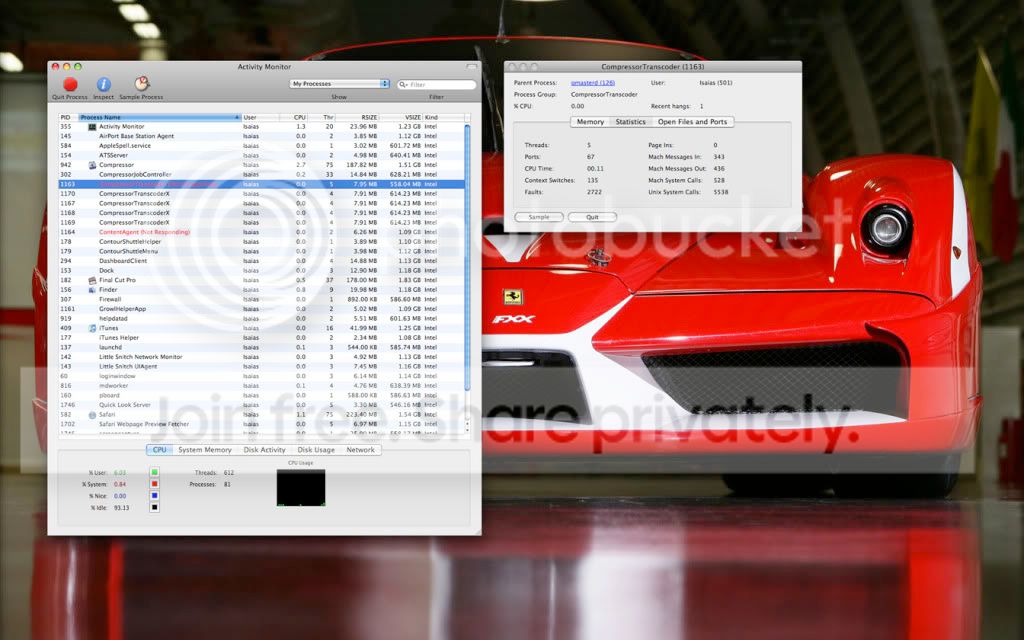
    I.m having an issue with compressor being able to use multiple instances an Qmaster. When I set it up for 4 instances (I have a dual 2.93GHz 8 core) I get the process CompressorTranscoder hanging (not responding). Here’s a screenshot of what I’m dealing with.

    Photobucket

    During a quicktime to h.264 job in Compressor, the Compressor process shown “not responding” actually uses up to 450% CPU while the aliases show 0%. This tells me the cluster isn’t being used as I have assigned it?

    I’ve tried removing Compressor/Qmaster using AppZapper and reinstalling Compressor again with the same results. Please help.

    Regards,

    Isaias Almanza

    Ken Machacek replied 16 years, 9 months ago 2 Members · 2 Replies
  • 2 Replies
  • Isaias Almanza

    July 21, 2009 at 2:46 am

    Also, is this true?

    On the new Mac Pro’s (Nehalem) hardware, Compressor sees 16 instances. Pretty cool.

    This means that the Mac OS 10.5.7 build on theses Mac Pro’s has the necessary Intel hyper-threading code, it must.

    (2 threads per core)

    8 cores, but Mac OS X sees them a 16 cores.

    Doing some tests, will let you know results”

    Taken from: https://www.devia.be/news/article/setting-up-a-virtual-cluster-to-speed-up-compressor/

    I also show 16 instances available.

  • Ken Machacek

    July 31, 2009 at 2:20 am

    I’m actually getting the exact same thing you are. “CompressorTranscoder” and all four of my “CompressorTranscoderX” (one for each instance, and I’m running 4 instances on my 8-core Mac Pro) show up in the Activity Monitor as “Not Responding”. This also goes for “CompressorJobController”, “ContentAgent”, and “ContentController”.

    However, that said, during an encoding process to my virtual cluster, each “CompressorTranscoderX” is using the CPU as normal. So it seems to be running just fine otherwise. To confirm this, I did a test on my own… Encoding normally using “This Computer” in Compressor, and encoding using my virtual cluster. When using “This Computer” (not my virtual cluster), the encode took 3:29. Using the same settings with my virtual cluster, it took only 2:40. Obviously, my virtual cluster is running, and it is speeding up the encode process… But still, this issue that we both have is very weird.

    Also, as a sidenote, I got another weird Qmaster issue earlier today. I tried encoding a movie with my virtual cluster in Compressor, and Compressor popped up with an error message saying it had an “internal error” and “Apple Qmaster File Agent not found”. It wouldn’t let me encode at all with my virtual cluster. So, I deleted my preference files, “Reset Services” in the Apple Qmaster preference pane, and restarted, and now everything works as I stated above.

    It is an odd issue, though… Compressor is accepting job processes to my virtual cluster, yet those “Not Responding” messages pop up in the Activity Monitor. If anyone has advice and/or a solution, I’m sure we’d both appreciate it.

We use anonymous cookies to give you the best experience we can.
Our Privacy policy | GDPR Policy