Creative Communities of the World Forums

The peer to peer support community for media production professionals.

Activity Forums Adobe After Effects Complete, dynamic color control?

  • Complete, dynamic color control?

    Posted by Eric Chard on February 3, 2021 at 1:35 am

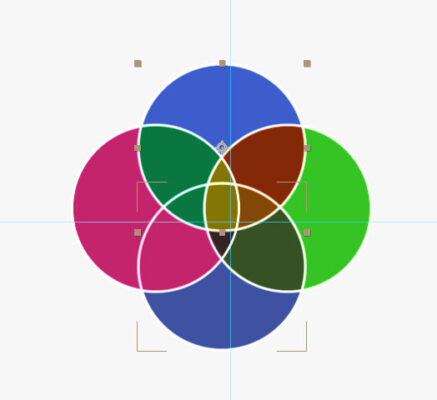
    Absolute color control? If I had a artistic director from hell, how could I make life easy on myself and achieve complete color control over this >animated< venn diagram, so that I could have completely control which colors are generated in every (moving) intersection?
    Each intersection color will be unique, and I can sample the colors AFTER the fact, but trying to predict them in advance is … well, it’s just not going to happen, there are too many variables.
    Michael Szalapski replied 5 years, 2 months ago 2 Members · 6 Replies
  • 6 Replies
  • Michael Szalapski

    February 4, 2021 at 12:27 am

    This would be much better if Colorama gave you more precise control…

    But, yes, you can. Make each circle’s fill a different opacity and then use Colorama to color each section since the color will be unique.

  • Michael Szalapski

    February 4, 2021 at 12:31 am
  • Eric Chard

    February 5, 2021 at 8:00 pm

    Thanks SO much! It’s perfect.

    I note that the white circles have expressions on *dozens* of parameters to hook them up with their ‘parents’. It seems unlikely that you went to all that bother, so did you use some kind of cloning tool?

    I noticed this because when I made a working copy of the comp, the expressions were hardcoded to a comp name, rather than using “thisComp.name”

  • Michael Szalapski

    February 5, 2021 at 9:46 pm

    My bad. I should have used a different function.

    AE has a Copy With Property Links and a Copy With Relative Property Links – I should have chosen the latter. All you have to do is highlight the colored circles, pick one of those options, then paste it and make sure they’re above the colored ones in the timeline, then select the copies, and (in the toolbar) turn off the fill and turn on the stroke. If you want to modify the width or color of the stroke, you have to do it on the original circles.

  • Eric Chard

    February 8, 2021 at 7:53 pm

    Gahh, I really need to remember all these things…

    So, COPY WITH PROPERTY LINKS is essentially “make a ‘following’ clone”? That is, the clone will imitate changes made to the original?

    TIL a new thing. Thanks.

  • Michael Szalapski

    February 8, 2021 at 10:14 pm

    Yeah, it just duplicates the selected layer(s) and links all of the properties of copies to the originals with expressions.

We use anonymous cookies to give you the best experience we can.
Our Privacy policy | GDPR Policy