Creative Communities of the World Forums

The peer to peer support community for media production professionals.

Activity Forums Adobe After Effects Codec / Compression Error (?)

  • Codec / Compression Error (?)

    Posted by Daniel Zimmer on May 20, 2021 at 5:32 pm

    Hello and thanks for stoping by,

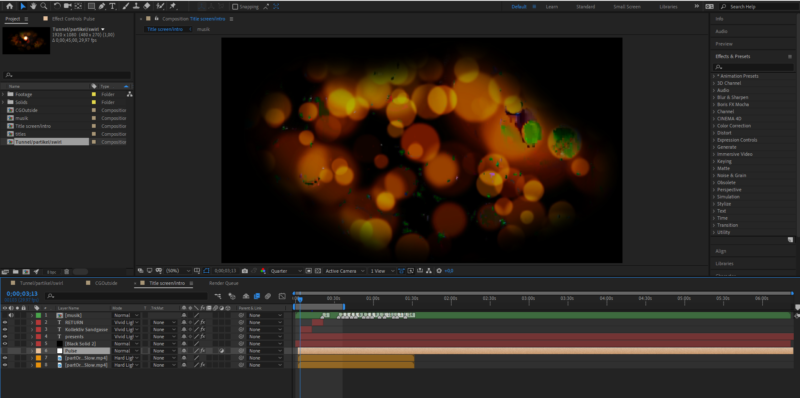
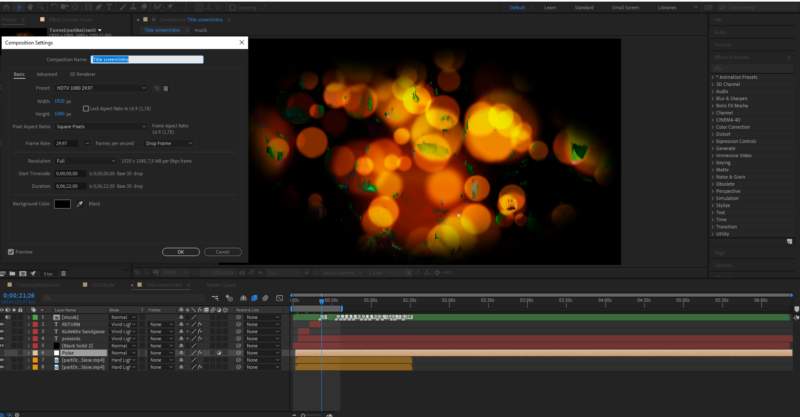
    i encounterd a problem that i have never seen before and i tryd solving it myself but it behaves strangley. I put 2 screenshots on this discussion to give you more insight.

    I will try to describe it as good as possible but please keep in mind that i am an AEnoob so please be patient with me, also excuse my poor english skills.

    I dont really know if it has something to do with codec/compression thats just my guess.

    I get these green picture error in my “dot footage”. I started with turning off layers and the effects attachd to my adjustment layers one by one to see if something takes to much power or get tangled up with something else that causes these image errors.

    This Error also occurd on another recent project but was only an issue in the preview, after rendering the project threw Media Encoder i had no errors in the finishd video.

    Now, however, these image errors as i call it persist threw rendering and are f!ing up the finishd product. Its also never the same, its not like i can go to 00:21:02 or some other timestamp and have the same picture error everytime. Sometimes its there in the preview sometimes its not. But its allways in the finishd render and after trying diffrent codecs and settings in the Encoder im not closer to solving nor understanding the problem.

    I dont even know the right word for this error wich makes googling a solution not that easy, but i tryd.

    If you need more information from me to help me out with this just post and i will deliver.

    Thanks again, i wouldnt ask you guys if i had another idea

    much love

    Daniel Zimmer replied 4 years, 11 months ago 3 Members · 6 Replies
  • 6 Replies
  • Daniel Zimmer

    May 20, 2021 at 5:35 pm

    screens

  • Chris Voelz

    May 20, 2021 at 8:12 pm

    Do you get them when playing the files outside of AE? If not try re-encoding them to another format like animation/prores/dnxhd and bring them back in.

  • Daniel Zimmer

    May 21, 2021 at 12:17 pm

    Hello, thanks for replying 🙂

    I dont get the error if i play the videofile with these dots on win mediaplayer or vlc. I also used the same footage of dots for another project and it did make the picture error in the AE preview window but not in the finishd render.

    Ill try re-encoding, and post results.

    greetings

  • Daniel Zimmer

    May 31, 2021 at 7:36 pm

    So i tested around a little bit.

    At first re-econding it did the trick for the file in the screenshots, so i thought the problem was solved. But the same issue happens with a new file, and this time re-encoding it doesnt solve it, it just reduces it. or increases it depending on what format i use.

    Now i have a tower pc as well, the screens where from my laptop. My pc is by no means high end stuff …more the opposite. BUT if i transfer the project with all keyfiles to my pc the issue is not here anymore.

    I suppose maybe i have to change something in the settings/prefernces of AE itself? Because my laptop is technicly on the same lvl as my tower, or at least not far away from it.

    Im confused, maybe got another tip 4 me?

    Thanks alot

    cheers

  • John Fishback

    May 31, 2021 at 8:41 pm

    I am not an AE power user. I’ve never had what you describe happen. However, on other programs when they start acting strange one fix that has often worked is to trash the preferences.

  • Daniel Zimmer

    June 2, 2021 at 2:15 pm

    i will try it out and report back.

    Thanks for your help, i really appricate it

We use anonymous cookies to give you the best experience we can.
Our Privacy policy | GDPR Policy